
By Elmer Wenston, updated . 5 min read.
IPTV Smarters Pro not working can mean two different problems. If you cannot install or update the app, the cause is not your device: when we checked in October 2026, the developer’s download site and the app’s Google Play listing no longer responded, and the Downloader code that pointed to that site stopped working too. If the app is already installed but crashes, refuses your login or loads nothing, the cause is usually the login, a stale cache or the connection. This guide covers both, starting with the quick checks. For the login error alone, see our guide to IPTV Smarters “failed to authorize”.
Is IPTV Smarters Pro still available in 2026?
Only partly. In October 2026 we checked the official sources:
- Fire TV, Android, Windows and Mac: the developer’s download site and the Google Play listing for IPTV Smarters Pro no longer respond, so there is no working official download or update.
- iPhone, iPad and Apple TV: the Apple version, Smarters Player Lite, is still in the App Store.
We do not know why the download site stopped responding, and we do not guess. What matters for you: avoid copies offered on APK sites and look-alike apps with “Smarters” in the name, which can be modified. Our IPTV Smarters setup guide is kept up to date with what still installs, and our guide to the IPTV Smarters Downloader code explains why code 6468112 stopped working.
How to tell the real app from a look-alike
Many apps use “Smarters” in their name, from many different developers. Before you trust an app that calls itself IPTV Smarters Pro, check:
- The developer name. The original app comes from WHMCS Smarters. A different developer name means a different app, whatever the icon looks like.
- Where it came from. An app installed from an APK site, a forum link or a short code found in a comment cannot be checked.
- What it sells. A player app does not sell channels. An app that offers channels or a subscription inside the app is not a plain player; our guide to the IPTV Smarters Pro subscription explains the difference.
If you are not sure which version you have, the safest choice is a player from an official store, set up with the login from your welcome email.
IPTV Smarters Pro not working: quick checks first
Before changing anything in the app, find out where the problem is:
- Try another device or app. If the same login works elsewhere, the problem is IPTV Smarters on this device. If it fails everywhere, the problem is the login or the service.
- Check your internet. Open a video in another app on the same device. If that buffers too, start with your network.
- Check your subscription’s end date in your account or welcome email; an expired login stops every app at once.
- Count the screens playing. If more screens play at once than your plan allows, the extra one stops.
If channels fail in every app, follow our step-by-step guide for when IPTV is not working.
“Unfortunately IPTV Smarters Pro has stopped”
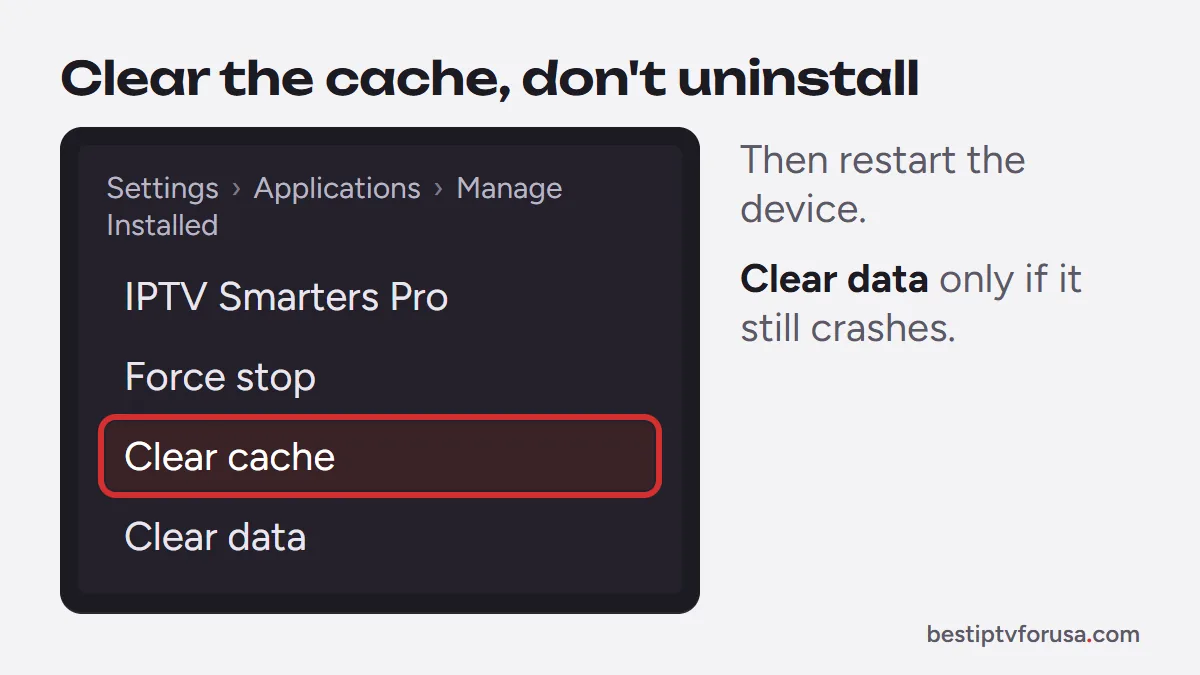
This message means the app crashed, often because of stale stored data. Fix it without uninstalling:
- Close IPTV Smarters Pro completely.
- On Fire TV, open Settings, Applications, Manage Installed Applications; on Android TV and Google TV, open Settings, then Apps. Select IPTV Smarters Pro and choose Clear cache.
- Restart the device, or unplug it for 30 seconds.
- Open the app again.
If it still crashes, choose Clear data instead. It removes the saved profile, so keep your welcome email at hand to sign in again.
Do not uninstall the app to fix it. With no working official download, you could not install it again from a trusted source.
Login and “failed to authorize” errors
If the app opens but refuses your login, the cause is almost always one wrong character in the server URL, username or password, an expired subscription or too many screens playing. Our guide to IPTV Smarters “failed to authorize” goes through the 7 fixes in order.
Channels, guide or movies not loading
When you are signed in but sections stay empty:
- Refresh the content. Use the app’s reload or refresh option, or sign out and back in.
- Check the login type. An M3U link may load live channels only; the Xtream Codes login loads live TV, movies, series and the guide. Our guide to Xtream Codes vs M3U explains the difference.
- Wait for the guide. The TV guide loads in the background after sign-in and can take a few minutes.
- Check the time zone. A wrong time zone shifts the guide, so programs look wrong or empty.
Not working on Firestick, Samsung or LG TVs
Some failures depend on the device:
- Fire TV: the newest Fire TV Sticks running Vega OS only install apps from the Amazon Appstore, so sideloaded players cannot be installed on them. Our comparison of Fire TV vs Google TV explains which models are affected.
- Samsung and LG TVs: several apps with “Smarters” in their name appear in TV app stores. Check the developer name before installing, or use IBO Player Pro or Hot Player as our smart TV guide shows.
Can’t update or reinstall? Switch to another player
If IPTV Smarters Pro keeps failing, moving to another player takes about five minutes and keeps the same subscription:
- Fire TV and Android TV: TiviMate for a full guide grid, or IBO Player Pro, which we activate for you with no typing.
- Smart TVs: IBO Player Pro or Hot Player.
- Windows and Mac: IBO Player, or VLC for a quick M3U check, as our PC and Mac guide shows.
- iPhone, iPad and Apple TV: Smarters Player Lite, which signs in exactly like Smarters Pro.
When you switch, three things change and one stays the same:
- Your login stays the same. Type the server URL, username and password from your welcome email, or send the new app’s device ID to support for activation.
- Favorites start empty. They are stored in each app, so mark your channels again in the new player.
- The guide reloads. Give it a few minutes after the first sign-in.
- The old app still counts if it plays. Stop playback in IPTV Smarters Pro so it does not use one of your plan’s screens.
Our comparison of the best IPTV player apps helps you choose. To test a new player with a fresh login, request the 24-hour free trial.
Questions people ask
Is IPTV Smarters Pro shut down?
We can only report what we checked: in October 2026 the developer's download site and the Google Play listing no longer respond. Smarters Player Lite, the Apple version, is still in the App Store.
Will my installed IPTV Smarters Pro keep working?
An installed copy signs in with the same steps as before. With no working official source for updates, you cannot count on future fixes, so keep another player in mind.
Is it safe to download IPTV Smarters Pro from APK sites?
No. Copies on APK sites and look-alike apps in stores can be modified, and you cannot check who changed them. Use a player from an official source instead.
Which app replaces IPTV Smarters Pro?
On Fire TV and Android TV, TiviMate or IBO Player Pro; on smart TVs, IBO Player Pro or Hot Player; on computers, IBO Player or VLC; on Apple devices, Smarters Player Lite. All sign in with your IPTV subscription.

Elmer Wenston writes the BestIPTVforUSA guides on IPTV setup, player apps and devices.