
By Elmer Wenston, updated . 4 min read.
When IPTV Smarters failed to authorize your login, the app could not get it accepted: either the IPTV server refused it, or a wrong server address sent it to the wrong place. The app itself is working; the details you typed, or the subscription behind them, are the problem. In most cases the fix is in the first two steps below, so start there and go down the list.
1. Retype the username and password exactly
IPTV logins are case-sensitive: JohnSmith and johnsmith are two different usernames to the server. Copy the username and password from your welcome email and check every character:
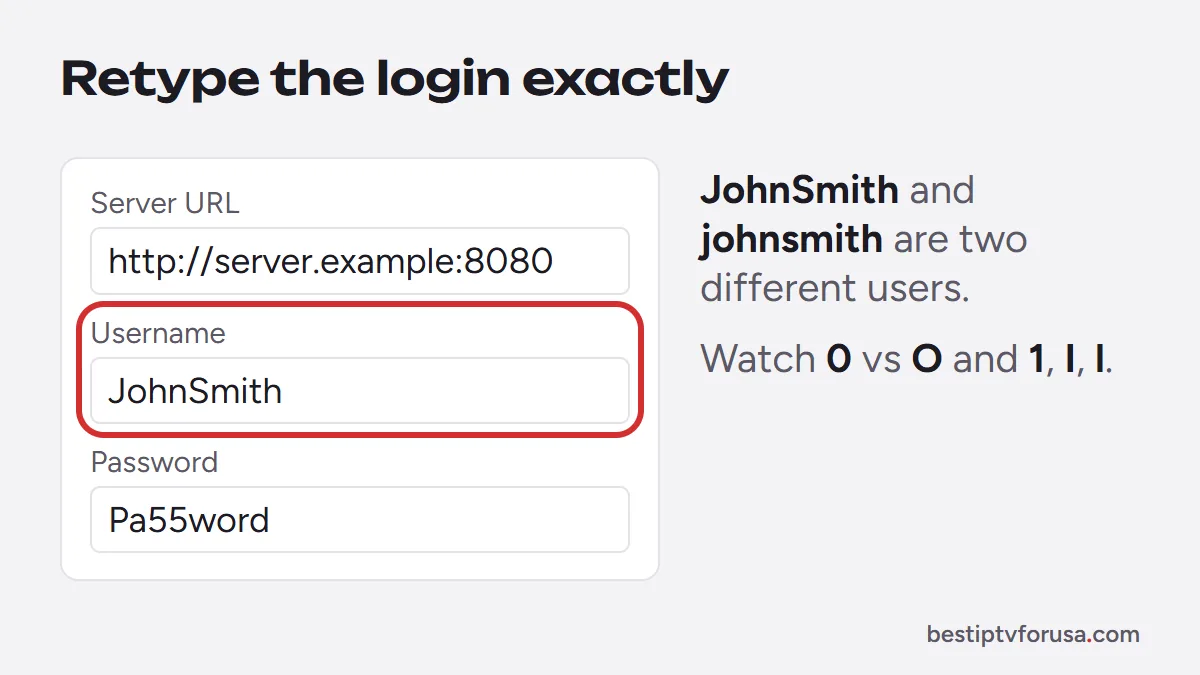
- Capital and lowercase letters match the email exactly.
- No space slipped in before or after a field. Phone keyboards often add one after autocorrect.
- Look-alike characters are right: the number
0and the letterO, the number1, the capitalIand the lowercasel.
On a TV, typing with the remote makes these mistakes easy. If you can, set up IPTV Smarters on a phone first to confirm the login works, then copy it carefully to the TV.
2. Check the server URL, including http:// and the port
The server URL is the most common hidden problem. It must be entered in full, the way your provider sent it:
- It starts with
http://(orhttps://if your email says so). Leaving it out is enough to fail. - If your email shows a port, such as
:8080or:80at the end, it must be there too. - There is no trailing path unless your email includes one. A server URL usually ends right after the port.
- No spaces, no commas, no period at the end.
In IPTV Smarters, choose Login with Xtream Codes API and put the URL in the URL field only, not in the username field.
3. Make sure the subscription is still active
An expired line gives the same message as a typo. Check the end date in your welcome email or your customer account. If you are on a free trial, it stops after its set time and the login stops authorizing with it.
BestIPTVforUSA plans never renew on their own, so a line ends quietly at the end of its period. Check the end date in your welcome email or My Account, then pick a renewal plan.
4. Count the screens playing at the same time
Each subscription allows a set number of screens at once. If the bedroom TV, a phone and the living-room stick are all playing on a one-screen plan, the next device to sign in can be refused.
Close the app fully on the other devices, wait a minute or two (release time varies by server), then sign in again. If your household often watches on more screens, a plan with more screens fixes it for good.
5. Restart the device and clear the app’s cache
A stale session can keep failing even after you fix the login.
- Close IPTV Smarters completely.
- On Fire TV, open Settings, Applications, Manage Installed Applications; on Android TV and Google TV, open Settings, then Apps. Select IPTV Smarters and choose Clear cache. Your login is kept.
- Restart the device from its settings menu, or unplug it for 30 seconds.
- Open the app and sign in again.
If that changes nothing, choose Clear data instead of Clear cache. It removes the saved profile, so you will type the login again from scratch, which often clears a hidden typo too.
6. Update IPTV Smarters, or reinstall it
On iPhone, iPad and Apple TV the app is Smarters Player Lite in the App Store, which updates through the App Store like any other app.
Old versions of the app sometimes fail with servers that work fine in newer versions. Check the version in the app’s settings and update it. On Fire TV, Android and computers there is no working official download of IPTV Smarters Pro to update from (checked October 2026); if an old version keeps failing, switch to a player from the Firestick installation guide, which signs in with the same login. On iPhone and Apple TV, update Smarters Player Lite from the App Store.
7. Turn off the VPN, then ask your provider
Some IPTV servers refuse connections from VPN or proxy addresses. Switch the VPN off, sign in once, and check whether the error goes away. If it does, try a different VPN location or leave it off while you watch.
Still failing after all seven checks? The problem is on the provider’s side: the line may be paused, locked to another device, or the server address may have changed. Send your provider a photo of the error screen and the email you ordered with. BestIPTVforUSA customers can reach support at any hour; we usually reply within minutes.
IPTV Smarters failed to authorize: similar errors and what they mean
| Message (wording varies by app version) | Usual cause | First fix |
|---|---|---|
| Failed to authorize | Login refused | Steps 1 to 3 |
| Invalid login or username or password incorrect | Typo in the login | Step 1 |
| Server not responding or connection timed out | Wrong URL or no internet | Step 2, then test your internet |
| Account expired | Subscription ended | Step 3 |
| Max connections reached | Too many screens playing | Step 4 |
If the error is something else, or IPTV Smarters signs in but shows no channels, the IPTV Smarters setup guide covers a clean setup and what still installs. If the app crashes, will not update or cannot be reinstalled, see IPTV Smarters Pro not working. For problems beyond sign-in, follow our step-by-step guide for when IPTV is not working.
Questions people ask
What does “failed to authorize” mean in IPTV Smarters?
The app could not get your login accepted. The username or password is wrong, the server URL is incomplete, the subscription has ended, or the line is already in use on too many screens.
Is IPTV Smarters broken or down?
Rarely. IPTV Smarters is only a player and has no channels of its own. When the login fails, the cause is almost always the details entered or the subscription behind them.
Should I use Xtream Codes or M3U in IPTV Smarters?
Xtream Codes. It loads the TV guide and the on-demand library automatically, and the three fields are easier to check than a long M3U link.
Can a VPN cause “failed to authorize”?
It can. Some VPN servers are refused by IPTV servers. Turn the VPN off, sign in again, and if it works, try another VPN location.
I am a BestIPTVforUSA customer. Who do I contact?
Our support team, day or night. Send a photo of the error and the email you ordered with. We reply at any hour, usually within minutes.

Elmer Wenston writes the BestIPTVforUSA guides on IPTV setup, player apps and devices.