
By Elmer Wenston, updated . 4 min read.
IPTV Smarters Pro does not need a subscription to install: it is a free player app, and it has no channels of its own. To watch anything, you add a login from an IPTV service, and that service is what you pay for. The phrase “IPTV Smarters Pro subscription” usually means a subscription to an IPTV service that you watch in the app. This guide explains what is free, what you pay for and what the app’s messages mean.
What IPTV Smarters Pro is, and what it is not
IPTV Smarters Pro is a media player made by the developer WHMCS Smarters. Its listing in the Samsung app store states that “IPTV Smarters does not supply or include any media or content” (IPTV Smarters Pro on the Samsung store). The Apple version, Smarters Player Lite, says the same in its App Store listing: it “does not provide, host, sell, or promote any media content, TV channels, or streaming services” (Smarters Player Lite on the App Store).
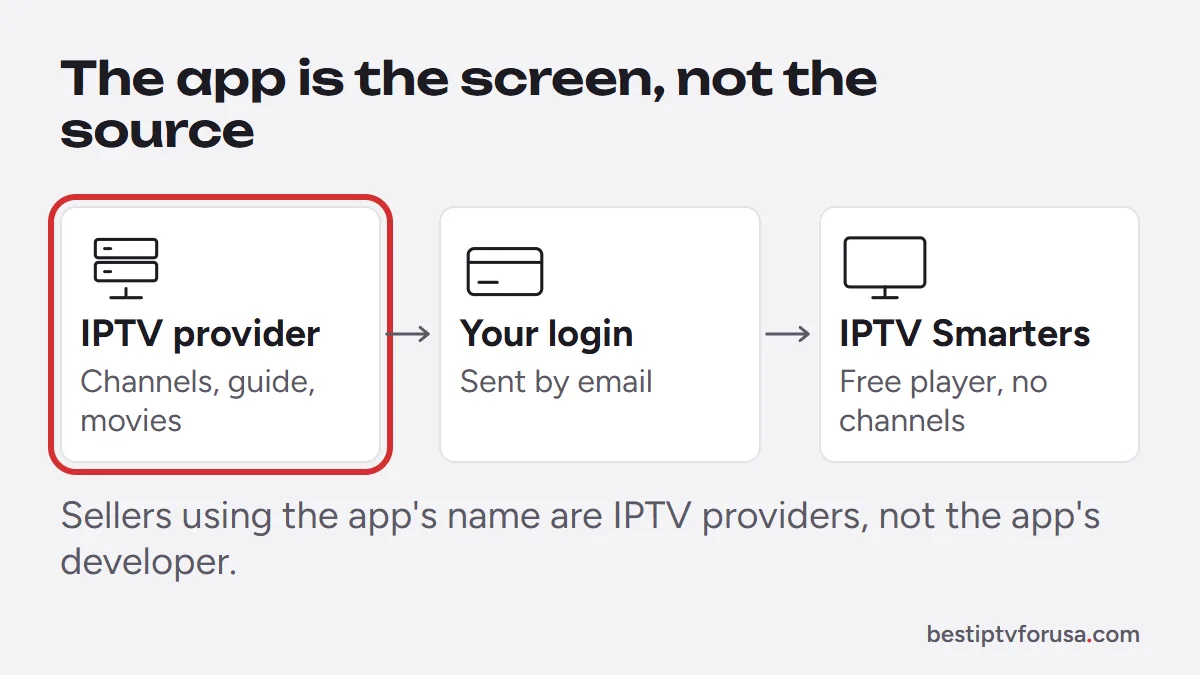
So the app is the screen, not the source. It reads the login your IPTV provider sends you, then shows that provider’s live channels, guide and on-demand titles in its own menus.
This is why search results look confusing. Many IPTV sellers use “IPTV Smarters Pro” in their own name or ads. They are IPTV providers using the app’s name, not the app’s developer. When you buy from them, you buy their IPTV service, which you then watch in the free app.
What you pay for, and what is free
Three separate things make IPTV work, and only one of them is a subscription.
| Part | Who provides it | Cost |
|---|---|---|
| The player app (IPTV Smarters Pro or Smarters Player Lite) | WHMCS Smarters, through app stores | Free to install; the Apple version lists an optional $1.99 premium upgrade |
| The IPTV service (channels, guide, on-demand library) | The IPTV provider you choose | A paid subscription, priced by that provider |
| The device (TV, stick, phone or computer) | You | What you already own |
The optional upgrade in the Apple listing is an in-app purchase for the app itself (App Store listing). It does not add channels. Store prices can change, so check the listing on your device before you buy.
How much an IPTV Smarters Pro subscription costs
The app costs nothing to install. The subscription price is set by the IPTV provider you choose, so it varies with the plan length and the number of screens you watch at once. Our guide to how much IPTV costs compares typical prices.
As one example, BestIPTVforUSA plans start at $30 for three months on one screen and cover up to six screens at once, with a 24-hour free trial and a 48-hour money-back guarantee. Nothing renews automatically. Every plan works in IPTV Smarters Pro and Smarters Player Lite with an Xtream Codes login, and all prices are on the IPTV subscription plans page.
When you compare providers, look past the price: a free trial on your own device, written refund terms and support that answers matter more. A provider that only takes payment methods you cannot dispute is a warning sign.
Is IPTV Smarters Pro still available?
Only partly. When we checked in October 2026, its developer’s download site and Google Play listing no longer respond (checked October 2026), so where you can still get it depends on the device:
- iPhone, iPad and Apple TV: the Apple version, Smarters Player Lite, is still in the App Store from the same developer.
- Fire TV, Android, Windows and Mac: there is no working official download. The Downloader code and the desktop downloads pointed to the developer’s site. Use TiviMate or IBO Player Pro instead, which sign in with the same IPTV subscription.
- Smart TVs: some TV app stores may still list Smarters-named apps; check the developer name before you install.
Our IPTV Smarters setup guide is kept up to date with what still installs.
Many copies with similar names exist in app stores. Check that the developer is WHMCS Smarters before you install, and avoid modified versions from unknown websites, which can carry unwanted software.
What “expired” means in IPTV Smarters Pro
An expired message comes from your IPTV account, not from the app. Your provider sets an end date on every login; when that date passes, the server stops sending channels and the app shows the account as expired.
To fix it:
- Check your account’s expiry date: many player apps show it in an account or settings screen, and your provider can confirm it.
- If the date has passed, renew or choose a new plan with your provider.
- If the date is still in the future, sign out and sign in again with the exact login from your welcome email, then contact your provider’s support.
A different message, “failed to authorize”, usually points to a typing error in the login or a server problem. Our guide to fixing IPTV Smarters “failed to authorize” walks through each cause.
Smarters Pro or another player?
IPTV Smarters Pro suited people who wanted one free app on the TV, the phone and the computer. Now that it no longer installs outside Apple devices, TiviMate is the common alternative on a Fire TV or Android TV; on Samsung and LG TVs, IBO Player Pro avoids typing a long login with the remote. Our comparison of the best IPTV player apps covers each device, and Smarters Player Lite vs Smarters Pro explains the two Smarters versions.
Try it before you subscribe
The simplest test costs nothing: install a player for your device, request a 24-hour free trial and type the login from your email. If the channels, guide and picture suit you in the app, the subscription is the only thing left to choose.
Questions people ask
Can I use IPTV Smarters Pro without a subscription?
You can install and open the app for free, but it shows nothing until you add a login from an IPTV service. The app is only the player; the channels come from the service you subscribe to.
How do I pay for an IPTV Smarters Pro subscription?
You pay the IPTV provider you choose, on its own website, then type the login it sends you into the app. You do not pay the app developer for channels.
What is a better app than IPTV Smarters Pro?
It depends on your device. TiviMate offers a fuller TV guide on Fire TV and Android TV, and IBO Player Pro avoids typing on smart TVs. Our comparison of the best IPTV player apps covers each device.
What is the difference between Smarters Player Lite and IPTV Smarters Pro?
Smarters Player Lite is the Apple version, from the same developer, for iPhone, iPad and Apple TV. IPTV Smarters Pro was the version for Android, Fire TV, smart TVs and computers, with no working official download in October 2026. Both accept the Xtream Codes login from your provider.

Elmer Wenston writes the BestIPTVforUSA guides on IPTV setup, player apps and devices.