
By Elmer Wenston, updated . 5 min read.
Xtream Codes and M3U are two ways to give a player app your IPTV login. Xtream Codes uses three short fields, a server URL, a username and a password, and loads live TV, the guide and the on-demand library together. An M3U link is one long address that returns the channel list. If your app supports Xtream Codes, use it; choose M3U, device activation or a MAG portal only when your app or device needs it.
The four IPTV login types at a glance
Every IPTV service sends you one or more of these. Which one you use depends on your app, not on the channels you get.
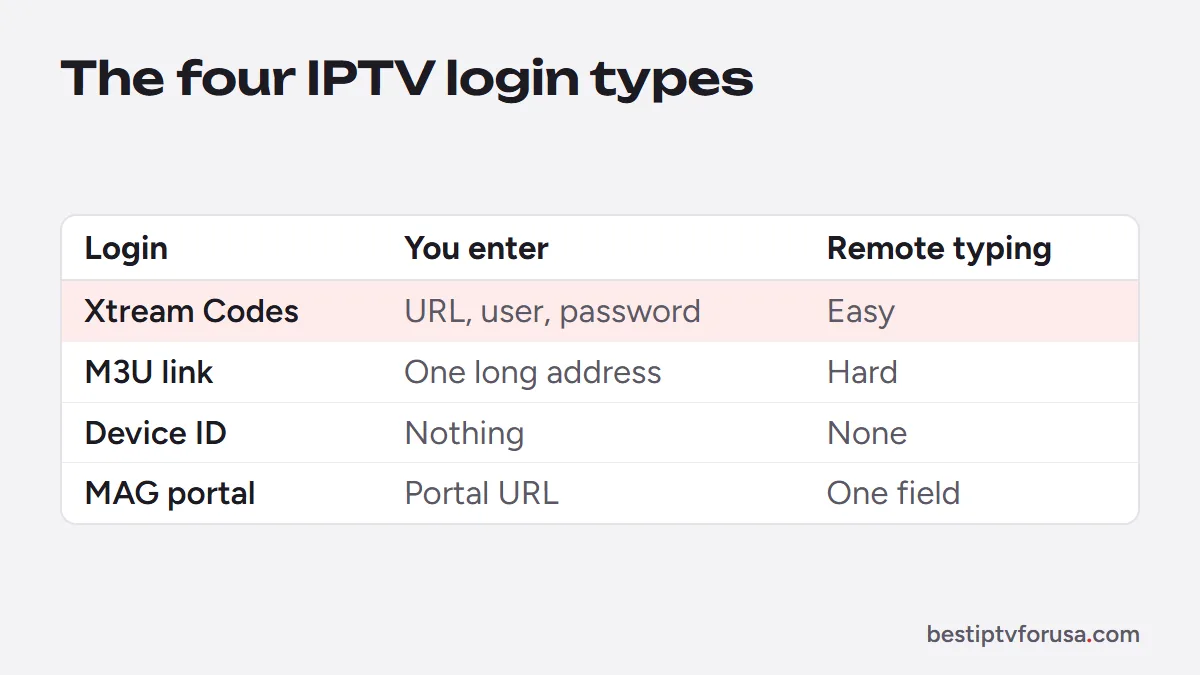
| Login type | What you enter | Guide and on-demand library | Typing on a TV remote |
|---|---|---|---|
| Xtream Codes | Server URL, username, password | Loaded automatically | Easy: three short fields |
| M3U link | One long web address | Channel list always; guide and library depend on the app | Hard: often 100+ characters |
| MAC or device ID activation | Nothing; you send the ID shown on screen | Loaded with the playlist attached to the device | None |
| MAG portal | Portal URL on the box | Loaded from the portal | One field |
If you are not sure what any of these are doing behind the scenes, our explainer on what IPTV is is a good starting point.
Xtream Codes: server URL, username, password
Xtream Codes takes its name from server software that many IPTV services adopted, and player apps kept the name for the login method, often shown as Xtream Codes API or XC. Instead of downloading one big list, the app asks the server for each part separately: live categories, the guide, movies, series and your account’s end date.
What you need to enter:
- Server URL, in full, starting with
http://and including the port if your email shows one, such as:8080. - Username and password, exactly as sent. Both are case-sensitive.
Most sign-in errors with this method come from a missing http://, a missing port or a capital letter typed in lowercase. Our guide to fixing “failed to authorize” covers each case.
M3U link: one address for the whole list
An M3U link returns a plain-text playlist of every channel and its stream address. It works in almost every IPTV player, including VLC, and is the only option in some smart TV apps. The trade-offs: it is long to type, the guide often needs a separate EPG link, and some apps do not build a movies and series library from it. M3U playlist explained shows what is inside the file and how to keep the link private.
MAC or device ID activation
Some apps never ask you to type a login. On first launch they show a MAC address (a hardware-style ID such as 00:1A:79:xx:xx:xx) and often a device key. You send those to your provider, who attaches your playlist to that device, and the app loads it on the next restart.
This is how IBO Player Pro, Hot Player, ELK Player and Set IPTV work. It is the simplest method on a TV because there is nothing to type, but each device has to be activated on its own, and these apps usually charge a small one-time fee per device after their trial. Step-by-step help is in the IBO Player Pro guide and the Hot Player guide.
MAG portal URL
MAG set-top boxes, and the STB Emulator app that imitates one, use a portal URL. You enter it in the box’s server settings, and the provider registers the box’s MAC address (printed on a label under the box) so the portal recognizes it. The MAG box setup guide has the menu path.
Which apps use which login?
| App | Xtream Codes | M3U link | MAC or device ID | Portal URL |
|---|---|---|---|---|
| TiviMate | Yes | Yes | No | Yes |
| IPTV Smarters / Smarters Player Lite | Yes | Yes | No | No |
| IBO Player Pro | Via activation | Via activation | Yes | No |
| Hot Player | Via activation | Via activation | Yes | No |
| ELK Player | Via activation | Via activation | Yes | No |
| Set IPTV | No | Via activation | Yes | No |
| UHF | Yes | Yes | No | No |
| VLC | No | Yes | No | No |
| MyTVOnline (Formuler) | Yes | Yes | No | Yes |
| MAG box / STB Emulator | No | No | MAC registered by provider | Yes |
“Via activation” means the playlist is attached to your device ID by the provider rather than typed in the app. Exact options change between app versions, so check the login screen of the version you install.
On Formuler boxes, the place to add a login also moves between MyTVOnline versions: in recent versions it sits under Menu, then Content Manager, then Content Sources, according to Formuler’s support knowledge base.
Pros and cons of each login type
| Login type | Pros | Cons |
|---|---|---|
| Xtream Codes | Full guide, movies and series in one sign-in; shows your end date; quick to type | Not supported by every app; three fields must be exact |
| M3U link | Works in nearly every player, including VLC; easy to paste on a phone or computer | Long to type on a TV; guide may need a second link; library support varies |
| MAC or device ID | Nothing to type; good for less technical users | One activation per device; most of these apps charge a small fee |
| MAG portal | Familiar interface on MAG boxes; one field | Tied to one box’s MAC address; fewer app features |
Which login should you choose?
Use this quick decision path:
- Does your app offer Xtream Codes? Use it. This covers TiviMate, IPTV Smarters, UHF and MyTVOnline.
- Does your app show a MAC address or device ID on first launch? Send it to your provider for activation.
- Do you have a MAG box or use STB Emulator? Use the portal URL.
- Only an M3U field? Paste the M3U link, then add the EPG link if the guide stays empty.
Not sure which app suits your screen? The setup guide for every device recommends one per device. Every BestIPTVforUSA plan includes Xtream Codes, M3U, device activation and MAG portal logins, and the 24-hour free trial lets you test the method you prefer before paying.
Questions people ask
What is Xtream Codes in IPTV?
It is a login method made of a server URL, a username and a password. The name comes from server software widely used by IPTV services, and most player apps now call the option Xtream Codes, Xtream Codes API or XC.
Is Xtream Codes better than M3U?
In most apps, yes. Xtream Codes loads live channels, the TV guide, movies and series in one sign-in and is easier to type with a remote. M3U is the better fit only when your app does not support Xtream Codes.
Can I turn an M3U link into Xtream Codes details?
Usually. Many M3U links contain the server address, a username and a password. The safer route is to ask your provider for the Xtream Codes details directly, so nothing is copied wrongly.
What is a MAC address in IPTV?
It is the hardware ID of your device or a code generated by the app. Apps that activate by MAC show it on screen; you send it to your provider, who links your subscription to that device.
Can I use the same login on several devices?
Yes, as long as the number of screens playing at the same time stays within your plan. Xtream Codes and M3U logins can be entered on each device; MAC-based apps need each device activated.

Elmer Wenston writes the BestIPTVforUSA guides on IPTV setup, player apps and devices.