
By Elmer Wenston, updated . 6 min read.
The best IPTV player is the one built for the device you watch on. On a Fire TV, IBO Player Pro if you want no typing or TiviMate if you want the fullest guide; on Android TV, TiviMate; on a Samsung or LG smart TV, IBO Player Pro; on an iPhone, iPad or Apple TV, Smarters Player Lite or UHF; and on a Roku, Hot Player. Every one of these apps is only a player: it shows the channels, guide and on-demand library of the IPTV service you sign in to, so you can switch apps without changing your subscription. If you are new to IPTV, our guide to what IPTV is explains how the pieces fit.
The best IPTV player apps compared
| App | Best on | How you sign in | Price (set by its developer) |
|---|---|---|---|
| TiviMate | Fire TV, Android TV, Google TV | Xtream Codes or M3U | Free; Premium about $10 a year or $35 lifetime for up to 5 devices |
| Smarters Player Lite | iPhone, iPad, Apple TV | Xtream Codes | Free |
| IBO Player Pro | Samsung and LG TVs, Fire TV, Apple TV, Android | Device ID, activated for you | 7-day trial, then about $8 once per device |
| ELK Player | Smart TVs, Fire TV, Android, Apple | Device ID, activated for you | 14-day trial, then about €6 once per device |
| Hot Player | Roku, Hisense VIDAA, smart TVs, Fire TV | MAC address, activated for you | Free period, then a small license fee |
| UHF | iPhone, iPad, Apple TV | Xtream Codes | Free, with an optional Pro plan |
| VLC | Windows, Mac | M3U link | Free |
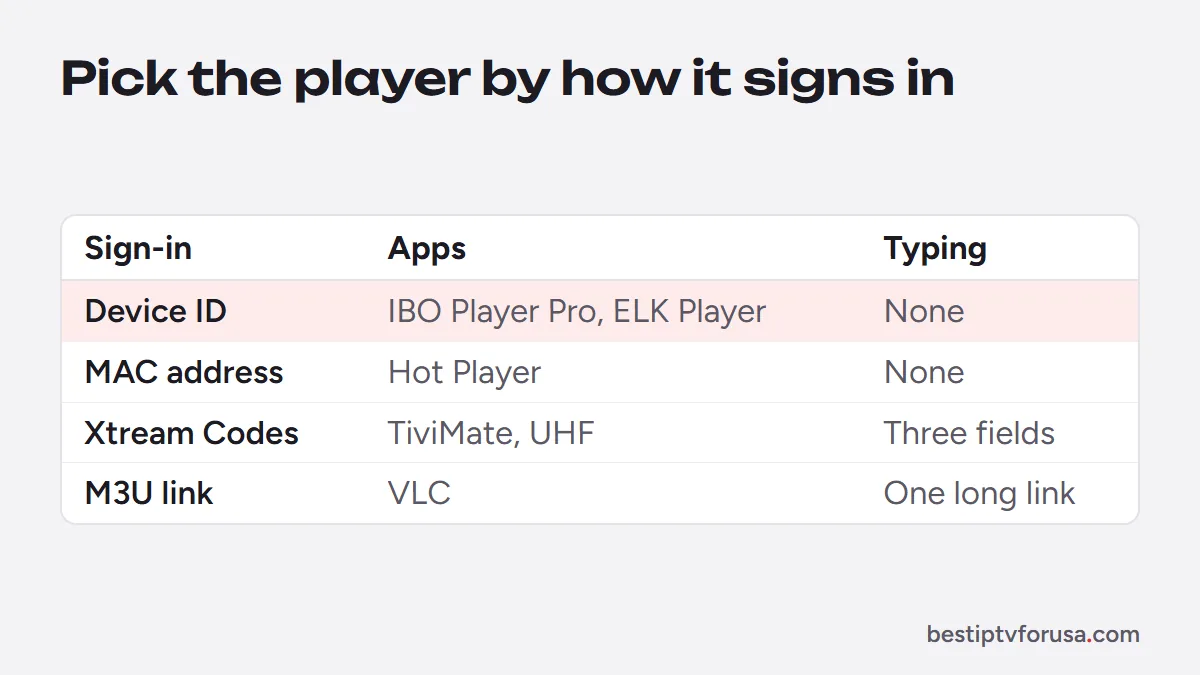
Prices change; check the developer’s site before you buy, for example tivimate.com for TiviMate and iboplayer.com for IBO Player Pro.
Best IPTV player for Fire TV and Android TV: TiviMate or IBO Player Pro
TiviMate is the closest thing to a cable box guide: channels down the side, time across the top, favorites and catch-up from the grid. It runs on Fire TV, Android TV, Google TV and Android phones. The free version plays everything; Premium adds extra features. Our TiviMate Premium guide covers price and activation, with current details on tivimate.com.
On a Fire TV, TiviMate installs with Downloader rather than from the Amazon Appstore; our list of Downloader codes for IPTV player apps has its code. The TiviMate setup guide covers adding your playlist.
Choose it if: you watch on a Fire TV or Android TV and want a full TV guide. If you would rather not type a login with the remote, IBO Player Pro, the app our Fire TV guide lists first, is activated with its device ID instead. Skip it if: you use Apple devices, a Roku or a Samsung or LG TV, where it does not run.
Best free IPTV players by device
IPTV Smarters Pro used to be the free choice that ran almost everywhere, but its developer’s download site and Google Play listing no longer responded when we checked in October 2026 (IPTV Smarters Pro not working explains what that means). Free players still cover every device:
- Fire TV and Android TV: the free version of TiviMate, or Televizo, a light Android player installed from its official site.
- iPhone, iPad and Apple TV: Smarters Player Lite, the Apple version of IPTV Smarters, and UHF (Smarters Player Lite vs Smarters Pro explains the versions).
- Computers: VLC, which plays your M3U link without a guide grid; our IPTV VLC guide shows the steps.
Each one signs in with the login from your welcome email and loads live TV, plus movies, series and the guide in the players that support them.
Choose one if: you want to pay nothing for the app and do not mind typing your login once.
Best IPTV player for Samsung and LG TVs: IBO Player Pro
Samsung (Tizen) and LG (webOS) TVs cannot run TiviMate. IBO Player Pro is in their app stores and is activated with the device ID it shows on its first screen: you send the device ID, the playlist is added to that TV, and nobody types a long login with the remote. After a 7-day trial it costs about $8 once for that device.
ELK Player and Set IPTV work the same way on smart TVs. The smart TV setup guide shows how to install each one.
Choose it if: you watch on the TV’s own apps and want no typing.
Best IPTV player for iPhone, iPad and Apple TV
Apple devices install apps from the App Store only, and two free players stand out there:
- Smarters Player Lite, the Apple version of IPTV Smarters, which signs in with Xtream Codes.
- UHF, a player for Apple devices only, free with an optional Pro plan.
IBO Player Pro and ELK Player are also in the App Store if you prefer device activation. The iPhone and Apple TV guide walks through each.
Best IPTV player for Roku: Hot Player
Roku only installs apps from its own Streaming Store, so most IPTV players are missing. Hot Player is one of the few that is there. It is activated with the MAC address on its first screen and, after a free period, charges a small license fee to its developer. Our page on IPTV on Roku compares it with casting, screen mirroring and a plug-in stick.
Best IPTV player for Windows and Mac
On a computer, IBO Player gives the full experience with the guide and on-demand library. VLC, the free media player, plays your M3U link without a guide grid, which is handy for a quick check. The PC and Mac guide covers both.
How to choose the right IPTV player app
Ask four questions, in this order:
- Does it run on my device? This rules out most apps straight away.
- Does it accept my login type? Xtream Codes, device ID or M3U. Our comparison of Xtream Codes and M3U explains the difference.
- Do I want a guide grid or simple menus? TiviMate for the grid, IBO Player Pro or Televizo for simpler menus.
- Will I pay a small one-time fee to avoid typing? Then choose a device-activated app such as IBO Player Pro.
You can install two players on the same device and keep the one you prefer. Each device playing at the same time still counts as one screen on your plan.
Free vs paid IPTV players
Free players are enough to watch everything your service includes. Paid players earn their price in specific cases: a device ID activation that spares you typing on a smart TV, or extra features such as recording in TiviMate Premium. The license is paid to the app’s developer, once per device or per year, and is separate from your IPTV plan. Our breakdown of what IPTV costs includes these app fees.
Try your player before you choose a plan
The quickest way to pick is to test. Install the app recommended for your device, request a 24-hour free trial, sign in and watch for an evening. If the guide, the remote and the picture suit your household, choose your screens on the IPTV subscription plans page.
Questions people ask
Which IPTV player is the best?
It depends on the device. On a Fire TV, IBO Player Pro needs no typing and TiviMate shows a cable-style guide grid; on Android TV, TiviMate is the usual pick. On a Samsung or LG TV, IBO Player Pro is the simplest because it is activated with the device ID. On Apple devices, Smarters Player Lite or UHF, and on a Roku, Hot Player.
What is a better app than IPTV Smarters Pro?
On Android TV and Fire TV, TiviMate offers a cable-style guide grid. On a TV where typing a login is painful, IBO Player Pro avoids it entirely. On Apple devices, Smarters Player Lite and UHF are free.
Is anything better than TiviMate?
On Android devices TiviMate is hard to beat for the guide. It does not run on Apple devices, Roku or Samsung and LG TVs, so there the better choice is simply the app that runs on your device: Smarters Player Lite or UHF on Apple, Hot Player on Roku, IBO Player Pro on smart TVs.
Is TiviMate illegal?
TiviMate is a player app with no channels of its own, published in Google Play. What it plays depends on the service you sign in to, so the question is about the provider, not the app. Our guide to legit IPTV services lists the warning signs of a risky provider.
What is the best free IPTV player?
TiviMate's free version works on Android TV and Fire TV, UHF is free on Apple devices with an optional Pro plan, and VLC is free on computers for M3U links.

Elmer Wenston writes the BestIPTVforUSA guides on IPTV setup, player apps and devices.