
By Elmer Wenston, updated . 4 min read.
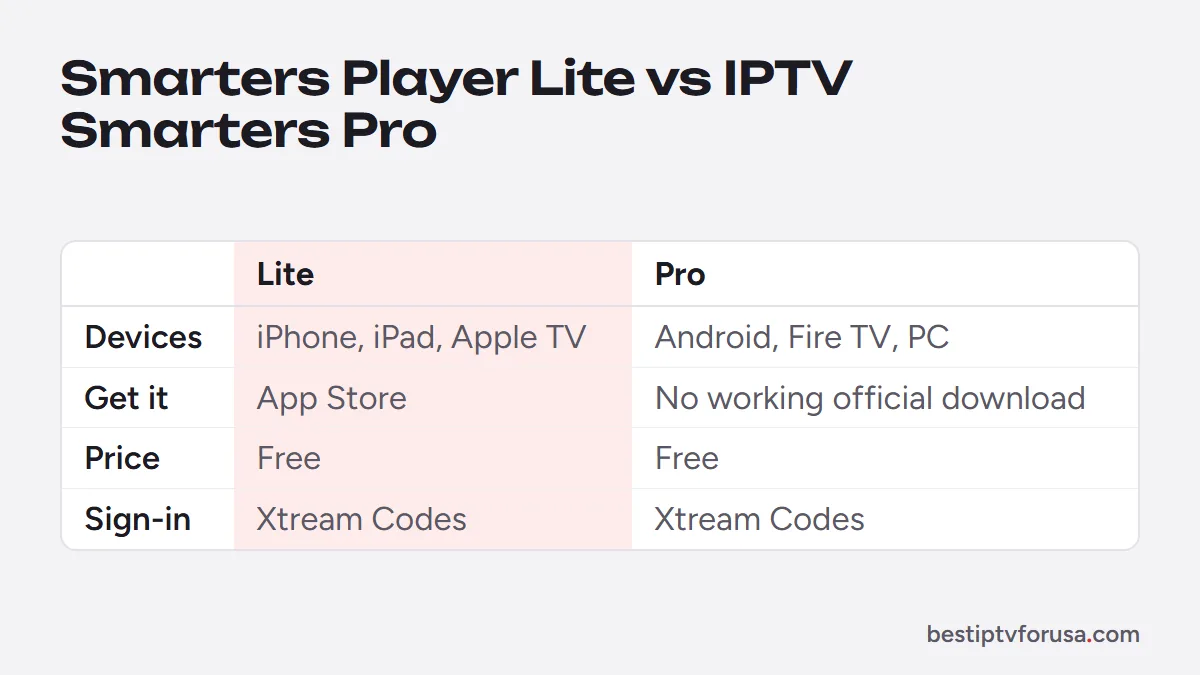
Smarters Player Lite and IPTV Smarters Pro are two versions of the same free IPTV player, built for different devices. Smarters Player Lite is the Apple version, available in the App Store for iPhone, iPad and Apple TV. IPTV Smarters Pro was the version for Android phones and tablets, Fire TV, Android TV boxes, Windows and Mac, but when we checked in October 2026 its developer’s download site and Google Play listing no longer responded. Both sign in the same way and play the service you subscribe to, so on Apple the choice is simple, and on other devices the question is which alternative to use. For the wider picture of players on each device, see our comparison of the best IPTV player apps.
Smarters Player Lite vs IPTV Smarters Pro at a glance
| Smarters Player Lite | IPTV Smarters Pro | |
|---|---|---|
| Devices | iPhone, iPad, Apple TV | Android, Fire TV, Android TV, Windows, Mac |
| Where to get it | App Store | The developer’s website or Downloader on Android and Fire TV, desktop installer on computers |
| Price | Free | Free |
| How you sign in | Xtream Codes | Xtream Codes |
| Channels included | None: it plays your service | None: it plays your service |
Smarters Player Lite is listed as Smarters Player Lite in the App Store.
Which one should you install?
Use your device to decide:
- iPhone or iPad: Smarters Player Lite.
- Apple TV: Smarters Player Lite, or another App Store player; our guide to the best IPTV app for Apple TV compares five.
- Fire TV, Android TV, Google TV or an Android phone: IPTV Smarters Pro no longer has a working official download: its developer’s download site and Google Play listing no longer respond (checked October 2026). Use TiviMate or IBO Player Pro instead; they sign in with the same subscription.
- Windows PC or Mac: the desktop version came from the same site, so use IBO Player or VLC, as our PC and Mac guide shows.
If your household mixes devices, for example a Fire TV in the living room and iPhones for the family, you can use both versions with the same login.
How both versions sign in
Both use an Xtream Codes login, the three details in your welcome email:
- Open the app and choose the option to log in with Xtream Codes (the wording varies slightly by version).
- Enter any name for the profile, then the server URL, username and password exactly as written. They are case-sensitive.
- Wait a minute or two while the app loads live TV, movies, series and the TV guide.
The server URL needs its http:// and port when your email shows them. Sign-in errors often come from a small typo or a missing part of the address; our guide to fixing “failed to authorize” walks through the checks in order.
What both versions play
Both sign in with the same Xtream Codes details and play the live TV, TV guide, movies and series of the service you subscribe to, with catch-up on channels that support it. Menus and layout can differ between versions and from one app update to the next, so follow the field names rather than the exact screen. Neither app comes with channels: what people call an IPTV Smarters Pro subscription is the IPTV service you sign in to.
Can you still install IPTV Smarters Pro on a Fire TV?
Not from an official source. Fire TV has no Google Play, and the Downloader code for IPTV Smarters Pro pointed to the developer’s site, which no longer responds (checked October 2026). Do not install copies from APK sites or forums, which can be modified.
On a Fire TV running Fire OS, install TiviMate, IBO Player Pro or ELK Player instead. Our list of Downloader codes for IPTV player apps has their codes, and the steps to show Developer Options if it is hidden.
Smarters vs other players
On Apple devices, Smarters Player Lite remains a good free choice. Elsewhere, or if you want something different, these players fit specific needs:
- A cable-style guide grid on Fire TV or Android TV: TiviMate.
- No typing with the remote on a smart TV or Apple TV: IBO Player Pro, activated with the device ID.
- A player built only for Apple devices: UHF.
You can install more than one player and keep the one you like; your login works in each.
Keeping Smarters up to date
Updates fix sign-in and playback problems, so install them when they appear. On iPhone, iPad and Apple TV, Smarters Player Lite updates through the App Store like any other app. On Fire TV and Android devices, IPTV Smarters Pro has no working official source for updates, so an old version stays as it is. If an update changes the menus, the sign-in fields remain the same three details from your welcome email.
Common problems with Smarters, and the fix
| Problem | Likely cause | Fix |
|---|---|---|
| Sign-in fails | Typo, expired line or missing http:// |
Retype the login, check the end date |
| Channels load, guide is empty | Guide not loaded yet | Wait a few minutes, then refresh the EPG |
| App closes or freezes | Stale data or device memory | Clear the app cache, restart the device; see Smarters Pro not working |
| Works on the phone, not the TV | Too many screens playing | Stop one device or add a screen to your plan |
Try Smarters with a free login
Install Smarters Player Lite on an Apple device, or another player elsewhere, then request a 24-hour free trial and sign in with the login from your email. The IPTV Smarters setup guide shows the login screens.
Questions people ask
What is the difference between Smarters Player Lite and IPTV Smarters Pro?
They are versions of the same player for different devices. Smarters Player Lite is the Apple version, for iPhone, iPad and Apple TV. IPTV Smarters Pro was the version for Android, Fire TV and computers, but its official download no longer works (checked October 2026). Both are free and sign in with Xtream Codes.
Is Smarters Player Lite free?
Yes. It is free in the App Store. You only need an IPTV subscription to sign in to, since the app has no channels of its own.
Can I use the same login on both apps?
Yes. The server URL, username and password from your welcome email work in both. Each device playing at the same time counts as one screen on your plan.
Does IPTV Smarters Pro work on iPhone?
On Apple devices, the version to install is Smarters Player Lite from the App Store. It signs in the same way and shows live TV, movies, series and the guide.
Why does Smarters say failed to authorize?
Often a typo in the username, password or server URL, an expired subscription or a missing http:// in the address. Retype the login exactly as written in your welcome email, then check your end date.

Elmer Wenston writes the BestIPTVforUSA guides on IPTV setup, player apps and devices.