
By Elmer Wenston, updated . 4 min read.
IPTV VLC setup is one of the quickest ways to watch your IPTV service on a computer. VLC media player, the free player from VideoLAN, opens IPTV playlists from an M3U link: choose Open Network Stream, paste the link from your welcome email and press Play, and your channels load in VLC’s playlist. VLC is a general media player, though, not an IPTV app: it has no TV guide grid, no catch-up from the guide and no Xtream Codes login. This guide shows the setup on Windows, Mac, Android and iPhone, how to switch channels, how to fix common errors and when a dedicated player is the better choice. It sits next to our guide to the XCIPTV Player, another free option.
What you need before you start
Two things, both free:
- VLC media player, downloaded from videolan.org or your device’s official app store. Avoid copies from download portals.
- Your M3U link, from your IPTV welcome email. It is a long address that contains your username and password; copy it in full, without spaces. Our guide to the M3U playlist explains what it contains.
Use the link from your own IPTV service. Public “VLC IPTV lists” shared on code-sharing sites are covered below.
IPTV in VLC on Windows
- Open VLC media player.
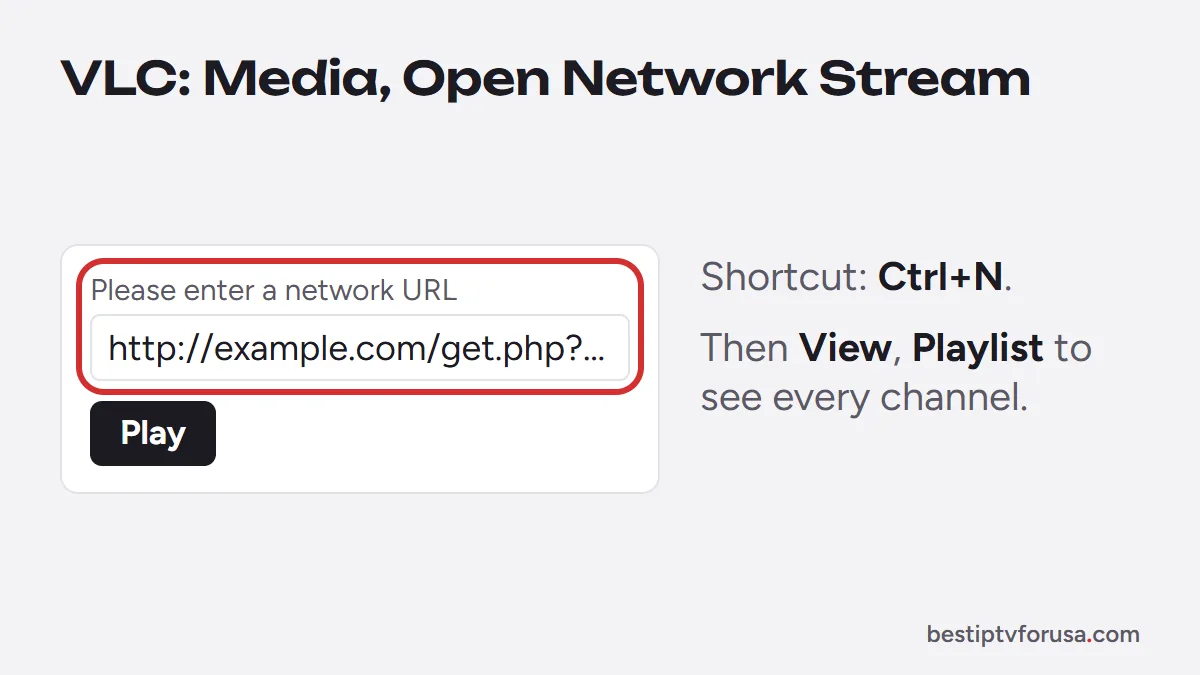
- Choose Media, then Open Network Stream (or press Ctrl+N).
- Paste your M3U link in the network URL field.
- Press Play. VLC starts the first channel of the list.
- Open the playlist with View, then Playlist (or Ctrl+L) to see every channel. Double-click a channel to switch.
The first load can take a few seconds while VLC reads the whole list.
IPTV in VLC on a Mac
The steps are the same with the Mac menu names:
- Open VLC, then File, then Open Network (Cmd+N).
- Paste the M3U link in the URL field and click Open.
- Open the playlist from the Window menu to see and switch channels.
For the other Mac options, including apps that show a TV guide, see our IPTV Mac guide.
VLC on Android and iPhone
VLC also exists as a free app for phones and tablets, with a network stream option:
- Android: open VLC, go to the More tab, choose New stream and paste the link.
- iPhone and iPad: open VLC, go to the Network tab, choose Open Network Stream and paste the link.
On a phone, VLC is fine for a quick check, but switching between hundreds of channels is easier in an IPTV app with groups and favorites. On iPhone, Smarters Player Lite and UHF are free; see IPTV on iPhone and iPad.
Switching channels and saving the playlist
A few habits make VLC easier to use with IPTV:
- Use the playlist search box to find a channel by name instead of scrolling.
- Save the playlist with Media, then Save Playlist to File, so you can open it later without pasting the link. If your link changes, save it again.
- Keep the link private. It contains your login; anyone who has it can use your screens.
IPTV VLC limits: what VLC can and cannot do
| Feature | VLC media player | IPTV player app (TiviMate, IBO Player Pro, Hot Player) |
|---|---|---|
| Plays live channels | Yes | Yes |
| TV guide grid | No | Yes |
| Catch-up from the guide | No | Yes, on supported channels |
| Movies and series sections | No, one long list | Yes, separate sections |
| Xtream Codes login | No, M3U link only | Yes, or activation by device ID |
| Favorites and groups | Basic, through the playlist | Yes |
| Price | Free | Free versions or a small fee |
VLC is the right tool for a quick test or for watching on a computer. For everyday viewing on a TV, our comparison of the best IPTV player apps helps you choose a player with a guide.
IPTV VLC not working: fixes
If VLC shows an error or nothing plays, check these causes in order:
- The link is incomplete. Long links are easy to cut when copying; copy it again from your welcome email.
- The subscription has ended, which stops the link in every player.
- A channel freezes or stutters. Increase VLC’s network caching: Tools, Preferences, select All under Show settings, open Input / Codecs and raise Network caching (ms), for example from 1,000 to 3,000. VideoLAN’s documentation describes VLC’s settings.
- Too many screens are playing. VLC counts as one screen on your plan, like a TV.
If channels fail in every player, see IPTV keeps freezing or our guide for when IPTV is not working.
Why not use free VLC IPTV lists
Search results for VLC IPTV often lead to public lists of free streams on code-sharing sites. They come with drawbacks:
- Links break often and nobody maintains them.
- There is no TV guide, and channel names are often wrong.
- You cannot check the sources, and files or apps shared next to these lists can be modified; the US Federal Trade Commission explains the warning signs in its guide to malware.
A maintained service gives you a stable link, a guide in your player and support when something breaks. To test one in VLC, request the 24-hour free trial and paste the M3U link from your email.
Questions people ask
Can VLC be used for IPTV?
Yes. VLC media player opens IPTV playlists from an M3U link on Windows, Mac, Android and iPhone. It shows the channel list and plays the streams, without a TV guide grid.
How do I add an M3U link to VLC?
On Windows, open Media, then Open Network Stream, paste the M3U link and press Play. On a Mac, use File, then Open Network. Then open the playlist view to see and switch channels.
Does VLC show the TV guide?
No. VLC lists channels by name but has no program grid. For a guide, catch-up and separate movies and series sections, use an IPTV player such as TiviMate, IBO Player Pro or Hot Player.
Can I use my IPTV username and password in VLC?
Not as separate fields. VLC needs the full M3U link, which already contains your username and password. Copy it exactly from your welcome email.
Is VLC free?
Yes. VLC is free and open-source software from VideoLAN, with no ads. Download it only from videolan.org or your device's official app store.

Elmer Wenston writes the BestIPTVforUSA guides on IPTV setup, player apps and devices.