
By Elmer Wenston, updated . 5 min read.
An M3U playlist is a plain-text file, or a link to one, that lists the address of every stream in your IPTV service. Your player app reads that list, shows each entry as a channel or title, and fetches the video from the provider’s server when you press play. The playlist itself holds no video, which is why it can be a few kilobytes even when it lists thousands of channels.
What is inside an M3U file?
Open an M3U file in any text editor and you see lines of text, not pictures or video. A short IPTV playlist looks like this (the addresses are placeholders):
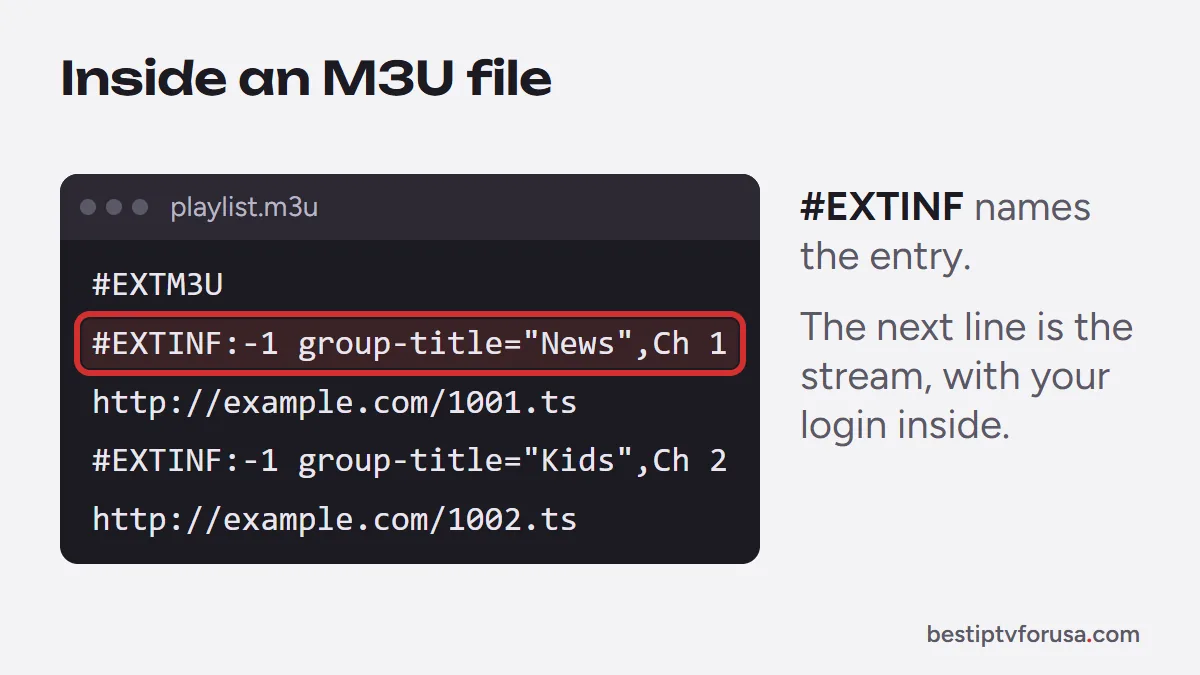
#EXTM3U
#EXTINF:-1 tvg-id="channel1" tvg-logo="http://example.com/logo1.png" group-title="News",Channel One
http://example.com:8080/live/username/password/1001.ts
#EXTINF:-1 tvg-id="channel2" group-title="Movies",Channel Two
http://example.com:8080/live/username/password/1002.ts
Each part has a job:
#EXTM3Uon the first line marks the file as an extended M3U playlist.#EXTINFdescribes the entry below it.-1means a live stream with no fixed length; the text after the comma is the name the app displays.tvg-idlinks the channel to its listings in the TV guide,tvg-logopoints to the channel logo, andgroup-titlesorts channels into categories.- The URL line is the stream itself. Notice that it contains a username and password.
The two tags #EXTM3U and #EXTINF come from the original M3U format, first used for music playlists. The tvg- attributes are not part of any formal standard; they are a convention that most IPTV players read. If you are new to how the streams reach your screen, our guide to what IPTV is and how it works covers the basics.
M3U vs M3U8: what is the difference?
The structure is the same. M3U8 is the same playlist encoded in UTF-8, so channel names with accents or non-Latin letters display correctly, and it is also the file format HTTP Live Streaming uses to list the segments of each stream (IETF RFC 8216). For you as a viewer, an IPTV app that opens one opens the other. Our guide to M3U vs M3U8 explains the difference in detail, with an example file and how to open it.
How do player apps use an M3U playlist?
There are two ways to give an app your playlist.
As a link (M3U URL)
This is the usual method. Your provider sends a long web address that returns the playlist. You paste it into the app once, and the app downloads it again on a schedule or when you refresh, so new channels and fixed addresses appear without you doing anything.
As a file
Some apps, mostly on computers, let you open a saved .m3u file. A file never updates on its own: if the provider changes a stream address, the file stops working for that channel. Use a link whenever you can.
Typical menu paths
Wording varies by app version, but on most devices it looks like this:
- TiviMate: Add playlist, then choose M3U playlist and enter the link. The TiviMate setup guide shows each screen.
- IPTV Smarters: Add user, then Load your playlist or file/URL, and paste the link in the URL field.
- VLC on a computer: Media, then Open Network Stream, and paste the link. Our IPTV VLC guide covers every device, and the PC and Mac guide covers the rest.
Apps that activate by device ID, such as IBO Player Pro or Hot Player, work differently: you send the ID shown on screen, and the playlist is attached to your device for you.
Why your M3U playlist shows no TV guide
An M3U playlist carries the channel list, not the program listings. The guide comes from a second link, usually called an EPG or XMLTV link, and the app matches each channel to its listings through the tvg-id value. If the guide is empty, either the EPG link was never added or the IDs do not match. Our article on what EPG is and how to fix an empty guide walks through both cases.
When to prefer Xtream Codes over M3U
If your provider gives you Xtream Codes details (a server URL, a username and a password) and your app supports them, use those instead of the M3U link. With Xtream Codes, the app asks the server directly for live channels, the TV guide, movies and series, so the guide and the on-demand library usually load without extra steps. The three short fields are also far easier to type with a TV remote than a link of a hundred characters or more.
M3U is still the right choice when:
- your app only accepts M3U, as with VLC and some smart TV players;
- you want to load the list on a computer to check it;
- your provider only offers M3U.
The full comparison, including device activation and MAG portals, is in Xtream Codes vs M3U: which login to use.
Keep your M3U link private
Look again at the stream address in the example above: the username and password sit inside it. Anyone who has your link has your login. Sharing it can:
- push you over your plan’s screen limit, so your own TV is refused;
- get the line paused for unusual use;
- expose your account details if the link is posted publicly.
Store the link in your email or a password manager, do not post it in forums or group chats, and ask your provider for a new one if you think it has leaked.
The same logic is why we do not link to public playlists. Lists shared online tend to stop working without warning, carry no guide or support, and can lead you to sites that push unwanted software. A private playlist from a paid service, which you can test first with a 24-hour free trial, avoids all three problems. When you are ready, our IPTV subscription plans include M3U, Xtream Codes and device activation logins on every plan.
Common M3U problems and quick fixes
| Symptom | Likely cause | Fix |
|---|---|---|
| App says the playlist is invalid or empty | Link copied incompletely or with a space | Copy it again in full from your email |
| Channels load, guide is empty | No EPG link added | Add the EPG link, or sign in with Xtream Codes |
| Channel names show strange symbols | Encoding mismatch | Ask for the M3U8 or UTF-8 version of the link |
| Some channels stopped working | Saved file is out of date | Load the playlist from its link, not a file |
| Every channel fails at once | Subscription ended or login changed | Check your end date, then contact support |
If you use the same login in IPTV Smarters and get a sign-in error, see how to fix “failed to authorize”.
Questions people ask
What is an M3U link in IPTV?
It is a web address that returns your playlist. Your player app downloads it, reads the list of channels inside, and refreshes it when the provider updates the lineup. It usually includes your username and password, so do not share it.
Is M3U the same as M3U8?
They have the same structure. M3U8 is the UTF-8 encoded version, which handles accents and non-Latin characters in channel names, and it is the playlist format used by HTTP Live Streaming. Most IPTV players open both.
Can I open an M3U file on my computer?
Yes. Any text editor shows the list of entries, and a media player such as VLC can play it. On a computer, VLC opens it from Media, then Open Network Stream for a link, or Open File for a saved file.
Why does my M3U playlist load channels but no TV guide?
An M3U playlist carries the channel list but the guide comes from a separate EPG link. Add the EPG link from your provider in the app's settings, or sign in with Xtream Codes, which loads the guide automatically.
Where can I find a free M3U playlist?
We do not point to free playlists. Shared lists break often, have no support and can expose your device to risks. A paid service with a free trial gives you a private playlist you can test first.

Elmer Wenston writes the BestIPTVforUSA guides on IPTV setup, player apps and devices.