
By Elmer Wenston, updated . 4 min read.
XCIPTV is an IPTV player for Android phones, tablets and TVs that IPTV providers can customize and brand. It has no channels of its own: you install it and sign in with the Xtream Codes or M3U login your provider sends you, and it loads live TV, the guide and on-demand titles. Because providers can rebrand it, you may meet XCIPTV under other names and logos. This guide covers what the app is, how to install it on Android TV and Fire TV, how to sign in and how to fix common problems.
What XCIPTV is
XCIPTV Player is published by the developer OTTRUN. Its app listing describes it as “Fully Customizable and Brandable for OTT Service Providers” and states that “The official XCIPTV PLAYER does not contain any media content” (the developer’s listing, as mirrored on APKMirror). It runs on Android phones, tablets and TVs.
Two consequences matter for viewers:
- It is a player, not a service. You need a subscription from an IPTV provider; the app only displays what that provider sends.
- Many versions exist. Providers can give XCIPTV their own name, colors and logo, and preset their server address. That is why search results show several apps that look like XCIPTV under different names.
Before installing any version, check who publishes it and where it comes from: the official listing, or your own provider.
Install XCIPTV on Android TV and Fire TV
Where you get XCIPTV depends on your device:
- Android TV and Google TV boxes, Android phones and tablets: install it from Google Play if it is listed for your device, or use the version your provider gives you.
- Fire TV running Fire OS (for example the Fire TV Stick 4K Plus, 4K Max or Fire TV Cube): install it with the free Downloader app, using the download link your provider sends you. Our guide to Downloader codes explains how Downloader works.
- Fire TV running Vega OS (the Fire TV Stick 4K Select and the newest Fire TV Stick HD): these only install apps from the Amazon Appstore, so the Downloader route does not work (AFTVnews). Use a player available in the Appstore on your stick, such as Hot Player.
Install XCIPTV only from Google Play, the developer’s official source or your own provider, and avoid “modded” versions offered on forums. They can carry unwanted software, and a version you cannot trace is hard to update or support.
Sign in to XCIPTV
The login comes from your IPTV provider’s welcome email. XCIPTV works with the two common formats:
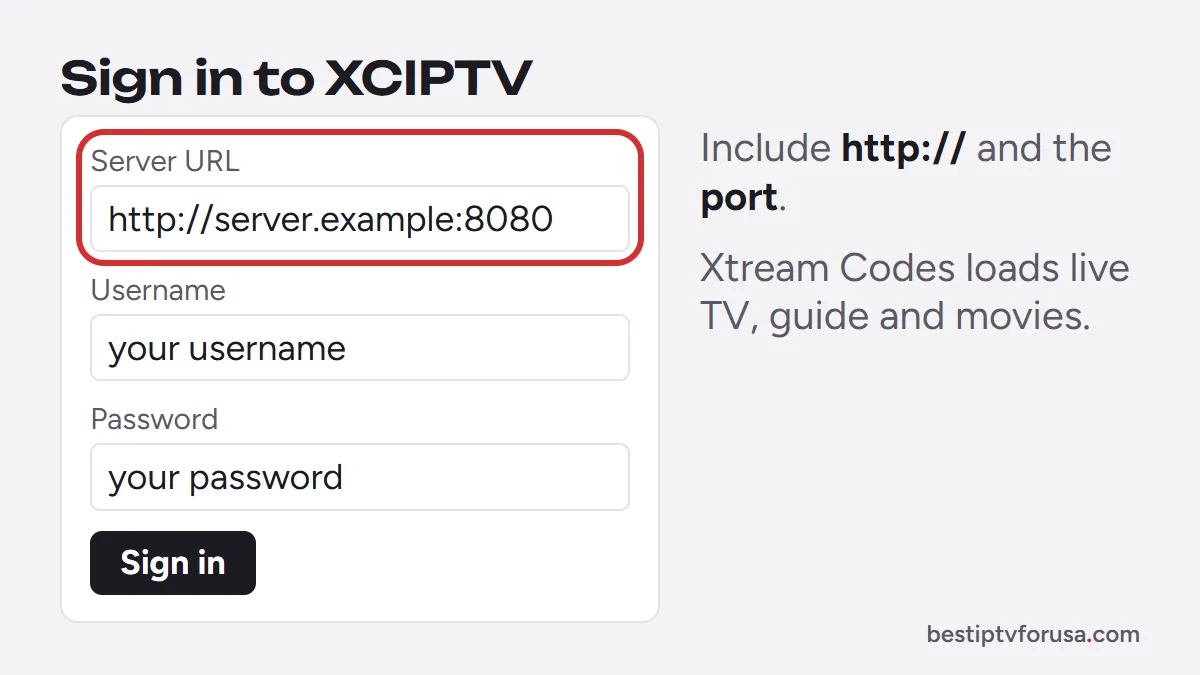
- Xtream Codes: a server URL, a username and a password. This is the most complete option: live TV, the TV guide, movies and series load in their own sections.
- M3U link: a single web address for the whole playlist. Channels load as one list; the guide may need a separate link from your provider.
To sign in, open the app, choose the login type and type each field exactly as it appears in your email, including http:// and any port number in the server URL. If your provider gave you a branded version, the server is often preset and the app only asks for your username and password.
After signing in, give the app a minute to load the channel list and the guide before you start browsing. Our comparison of Xtream Codes vs M3U explains which login to choose when your provider offers both.
XCIPTV problems and fixes
| What you see | Likely cause | Fix |
|---|---|---|
| Login refused or “invalid” | Typing error in the server URL, username or password | Retype each field exactly, including http:// and the port |
| App shows another provider’s name or logo | A branded version made for another provider | Use the version or login from your own provider |
| Channels load, guide empty | M3U login without a guide link, or guide still loading | Wait a few minutes; prefer the Xtream Codes login |
| Picture buffers at busy times | Wi-Fi signal or speed | Use Ethernet or 5 GHz Wi-Fi; see the buffering guide |
| Cannot install on a Fire TV Stick | Vega OS model | Use an Appstore player or an Android TV box |
If the same login works in another player but not in XCIPTV, the problem is the app version: reinstall it from the official source. If it fails everywhere, contact your provider. Our IPTV buffering fixes cover picture problems in more detail.
XCIPTV vs TiviMate and IPTV Smarters
Another free Android option is Televizo, installed from its official site in 2026.
XCIPTV is a good choice when your provider recommends it or gives you a branded version, because the server settings are already done. If you choose your own player, compare it with the other common options:
| XCIPTV | TiviMate | IPTV Smarters Pro | |
|---|---|---|---|
| Devices | Android phones, tablets, TVs; Fire TV (Fire OS) via Downloader | Android TV, Google TV, Fire TV | Android, Fire TV, Samsung TVs, Windows, Mac |
| Logins | Xtream Codes, M3U | Xtream Codes, M3U | Xtream Codes, M3U |
| Strength | Provider branding, simple setup | Cable-style guide grid | Same app on many devices |
The same IPTV login works in all of them, so you can try more than one. Our comparison of the best IPTV player apps covers each device, and the best IPTV app for Firestick focuses on Fire TV.
Try XCIPTV with a free login
Request a 24-hour free trial: the welcome email includes an Xtream Codes login and an M3U link, so you can sign in to XCIPTV on your Android device and check the channels, the guide and the picture before choosing a plan.
Questions people ask
Does XCIPTV come with channels?
No. Its listing states that the official XCIPTV PLAYER does not contain any media content. Channels come from your IPTV provider's subscription; some providers also hand out their own branded version of the app.
How do I log in to XCIPTV?
Open the app and enter the login from your IPTV provider: the server URL, username and password for Xtream Codes, or an M3U link. Branded versions from a provider may only ask for the username and password.
Can I use XCIPTV on an iPhone?
The XCIPTV listing describes an app for Android phones, tablets and TVs. On iPhone, iPad and Apple TV, use a player from the App Store such as Smarters Player Lite.
How do I get XCIPTV on my Firestick?
On Fire TV models running Fire OS, such as the Fire TV Stick 4K Plus or 4K Max, install it with the Downloader app, using the download link your provider sends you. Fire TV Sticks running Vega OS only install Amazon Appstore apps.

Elmer Wenston writes the BestIPTVforUSA guides on IPTV setup, player apps and devices.