
By Elmer Wenston, updated . 4 min read.
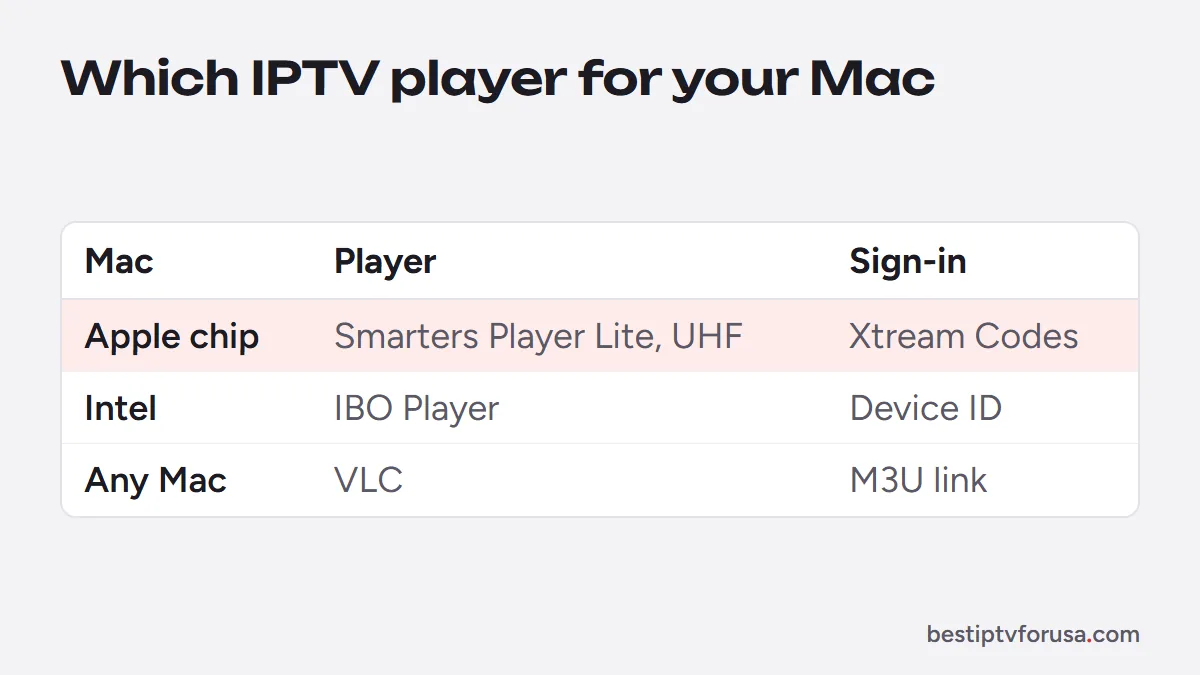
IPTV Mac setup works with the right player app, and the right one depends on your Mac’s chip. On a Mac with an Apple chip (M1 or later), Smarters Player Lite and UHF install from the App Store as iPad apps that run on the Mac. On any Mac, including older Intel models, IBO Player and VLC work. One popular option is gone: IPTV Smarters Pro’s Mac download came from the developer’s site, which no longer responded when we checked in October 2026. This guide shows which app suits your Mac, how to sign in and how to put the picture on your TV. For iPhone and iPad, see IPTV on iPhone and iPad.
IPTV Mac apps compared
Check your Mac’s chip first: open the Apple menu, then About This Mac. “Chip: Apple M1” (or M2, M3 and later) means an Apple-chip Mac; “Processor: Intel” means an Intel Mac.
| App | Apple-chip Mac | Intel Mac | How you sign in | Cost |
|---|---|---|---|---|
| Smarters Player Lite | Yes, App Store | No | Xtream Codes login | Free; optional $1.99 premium upgrade |
| UHF | Yes, App Store | No | Xtream Codes login | Free; optional Pro plan |
| IBO Player | Yes, from its developer | Yes, from its developer | Device ID, activated for you | Set by its developer |
| VLC | Yes | Yes | M3U link | Free |
The App Store listings of Smarters Player Lite and UHF state that the Mac versions require a Mac with an Apple M1 chip or later (macOS 12.5 or later for Smarters Player Lite, macOS 13 or later for UHF).
Apple-chip Macs: App Store players
On an Apple-chip Mac, the simplest route is the App Store, which installs and updates apps like any other:
- Open the App Store on your Mac and search for Smarters Player Lite or UHF.
- Install the app. Both are iPad apps that Apple lets run on Apple-chip Macs, so the layout looks like a tablet’s.
- Sign in. Choose the Xtream Codes login and type the server URL, username and password from your welcome email, exactly as written.
Smarters Player Lite comes from WHMCS Smarters, the developer of IPTV Smarters, and signs in the same way. Our comparison of Smarters Player Lite vs IPTV Smarters Pro explains the two versions.
Intel Macs: IBO Player or VLC
App Store iPad apps do not run on Intel Macs, so use a player made for macOS:
- IBO Player offers a macOS version on its developer’s download page. Open it, note the device ID it shows and send it to us; we activate your playlist, and you get live TV, the guide, movies and series.
- VLC, the free media player from VideoLAN, plays your M3U link: choose File, then Open Network, and paste the link from your welcome email. It shows the channel list without a guide grid, which is handy for a quick check.
Our PC and Mac setup guide has the full steps for both.
IPTV Smarters Pro on Mac in 2026
Many searches for IPTV on a Mac are really for IPTV Smarters Pro. Its Mac version was a download from the developer’s own website, and when we checked in October 2026, that site no longer responded; the Android version’s Google Play listing was gone too.
Download portals still offer “IPTV Smarters Pro for Mac” files. Avoid them: you cannot check whether a file from a third-party site has been modified. On an Apple-chip Mac, Smarters Player Lite is the official Apple version from the same developer. On an Intel Mac, IBO Player or VLC replace it. Our guide to IPTV Smarters Pro not working explains the situation in detail.
Watch IPTV from your Mac on the TV
A Mac is handy for setup, but you may prefer the big screen. Two ways work:
- AirPlay. Send the Mac’s screen or the player window to an Apple TV or an AirPlay-compatible TV, as Apple’s Mac User Guide explains.
- An HDMI cable from the Mac (with an adapter if needed) to the TV, which avoids any Wi-Fi delay.
For everyday viewing, a player app installed on the TV itself is usually smoother; our IPTV on Apple TV guide covers the Apple TV apps.
Before you start with IPTV on a Mac
Whichever app you choose, keep two points in mind:
- A Mac counts as a screen. While it plays, it uses one of the screens in your plan, like a TV or a phone.
- Xtream Codes is easier than M3U in apps that accept both: it loads live TV, movies, series and the guide in separate sections. Our guide to M3U vs M3U8 explains the playlist link.
To test your Mac before choosing a plan, request the 24-hour free trial and sign in with the login we send you.
Questions people ask
Can I watch IPTV on my MacBook?
Yes. Install a player app, sign in with the login from your welcome email and watch. On an Apple-chip MacBook, Smarters Player Lite or UHF from the App Store; on an Intel MacBook, IBO Player or VLC.
Can I use IPTV Smarters Pro on a Mac?
Not from an official source in October 2026: its Mac download came from the developer's site, which no longer responds. On an Apple-chip Mac, Smarters Player Lite, the Apple version from the same developer, installs from the App Store.
What is the best free IPTV player for macOS?
VLC is free on every Mac and plays your M3U link without a TV guide. On an Apple-chip Mac, Smarters Player Lite and UHF are free to install, with optional paid upgrades.
Does watching on my Mac use a screen?
Yes. Each device playing at the same time counts as one screen on your plan, whether it is a TV, a phone or a Mac.

Elmer Wenston writes the BestIPTVforUSA guides on IPTV setup, player apps and devices.