
By Elmer Wenston, updated . 5 min read.
What is IPTV? It is television that reaches your screen over the internet instead of a cable line, a satellite dish or an antenna. You watch live channels, a TV guide, movies and series in an app on your smart TV, streaming stick, phone or computer, and the picture arrives through the same connection you use for everything else at home.
What does IPTV stand for?
IPTV stands for Internet Protocol Television. “Internet Protocol” is the set of rules every device on the internet uses to send data, so the name simply means television carried as internet data.
The International Telecommunication Union, the United Nations agency that sets telecom standards, defines IPTV as “multimedia services such as television/video/audio/text/graphics/data delivered over IP based networks managed to provide the required level of QoS/QoE, security, interactivity and reliability” (ITU-T, IPTV Joint Coordination Activity). In plain words: TV carried over internet technology. The formal definition describes networks run by an operator; most IPTV services today run over the open internet instead, as explained below.
How does IPTV work?
IPTV turns television into a stream of small data packets, sends them across the internet and rebuilds the picture on your screen. The journey has four stages:
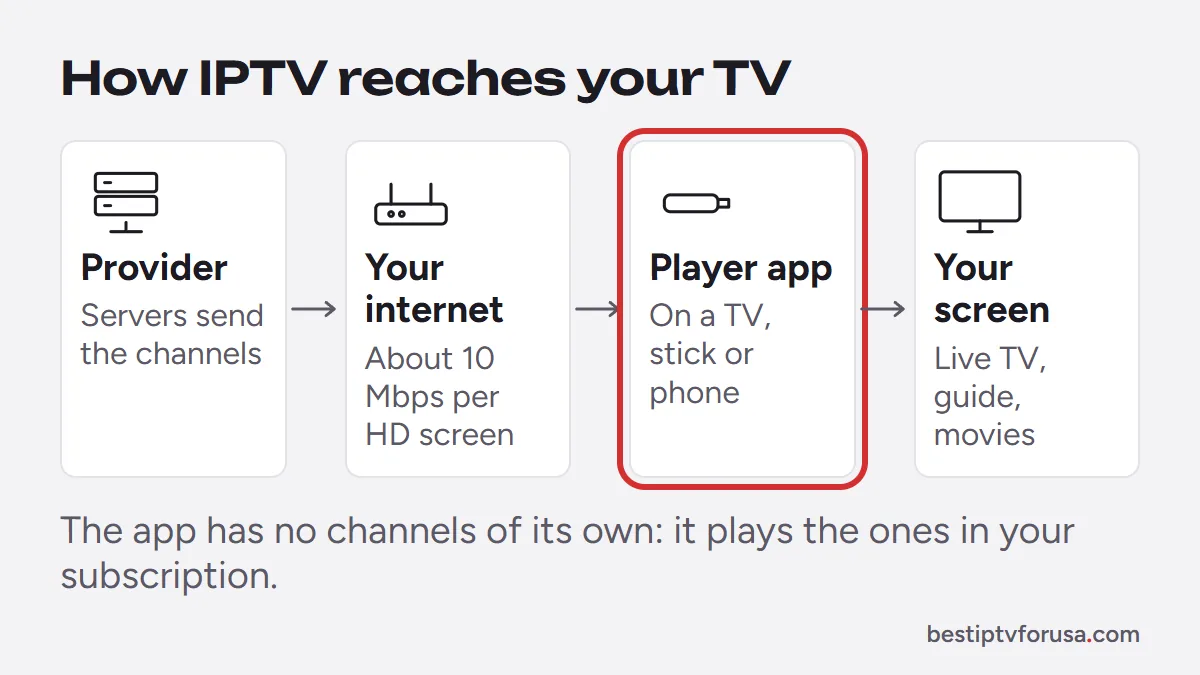
- The source. Live channels and on-demand titles are captured and encoded into compressed video formats.
- The servers. The provider’s servers hold the on-demand library and relay the live channels, splitting each one into short segments.
- Your connection. The segments travel to your home over your normal broadband, fiber or 5G home internet.
- The player app. An app on your TV or stick requests the segments, buffers a few seconds of video and plays them in order, with a TV guide on top.
IPTV services usually offer three ways to watch: live TV as it airs, video on demand you start whenever you like, and catch-up, on channels that support it, which lets you restart a program that already began, straight from the guide.
Managed IPTV and internet IPTV
There are two families of IPTV. Some phone and broadband companies run managed IPTV over their own private network, delivered to a set-top box they rent you. Most IPTV services people search for today work over the top of any internet connection instead: you bring your own device and your own internet provider, and an app does the rest. BestIPTVforUSA works the second way.
IPTV vs cable, satellite and streaming apps
IPTV sits between cable and streaming apps: it gives you live channels in a guide like cable, on the devices you already use for streaming. For prices, contracts and equipment side by side, see IPTV vs cable.
| Feature | IPTV service | Cable or satellite | Streaming apps |
|---|---|---|---|
| How it arrives | Your home internet | Cable line or dish | Your home internet |
| Equipment | The TV, stick or phone you own | A rented box per TV | The TV, stick or phone you own |
| Live channels and guide | Yes | Yes | Some, varies by app |
| Contract | Usually none | Sometimes, especially for satellite | Usually none |
| Watch away from home | Usually yes | Limited | Yes |
The shift is already well under way. In August 2026, streaming accounted for 49.6% of all TV watch-time in the US, ahead of cable at 18.9% and broadcast at 17.5% (Nielsen, The Gauge, released October 22, 2026).
What do you need to watch IPTV?
You need four things: home internet, a device, a player app and a subscription.
1. Home internet. The FCC lists 5 to 8 Mbps for HD streaming and 25 Mbps for 4K (FCC Broadband Speed Guide). We suggest about 10 Mbps for each HD screen and 15 Mbps for each Full HD screen to leave headroom, added together for screens playing at the same time. A wired Ethernet connection or strong 5 GHz Wi-Fi matters more than the headline speed of your plan.
2. A device. A smart TV that runs apps (Samsung, LG, Android TV, Google TV), a streaming stick such as a Fire TV Stick, an Apple TV, an Android box, a phone, a tablet or a computer. Roku works too, with a few limits.
3. A player app. TiviMate, IBO Player Pro, ELK Player and Hot Player are the most common. Each one shows the channels from your login, sent either as an M3U link or as Xtream Codes details; none comes with channels of its own. Our setup guide for every device tells you which app suits your screen.
4. A subscription. The service provides the channels, the guide and the library, and sends you a login for your player app.
For a 4K picture, every link in the chain has to support it, from the TV to the connection. The 4K IPTV guide walks through each check.
Is IPTV free?
Some IPTV is free, but free playlists shared online tend to stop working without warning, have no guide or support, and can be a way to push unwanted software onto your device. Whether any IPTV service is lawful depends on whether its provider holds the rights to what it streams, so be wary of anything that offers everything for nothing.
A paid service comes with a working guide, regular updates and someone to ask when something goes wrong. The safest way to judge one is to test it first. A good provider:
- offers a free trial on your own device before you pay;
- publishes its prices, refund terms and conditions;
- tells you how to report a rights problem, with a DMCA or copyright page;
- answers your questions before you buy.
How to get IPTV, step by step
Getting IPTV takes about ten minutes on most devices. The short version is below; how to get IPTV at home covers each step in more detail.
- Test it free. Request a 24-hour IPTV free trial and receive a login by email within minutes.
- Install a player app on your TV or stick. On a Firestick you install it with the free Downloader app; the Firestick guide has the codes.
- Sign in with the login from your email, or send the device ID your app shows so the provider activates it.
- Watch for a day. Try live TV at a busy time, a 4K title if you have a 4K TV, and each device you plan to use, one at a time.
- Choose a plan that matches your household. BestIPTVforUSA IPTV subscription plans start at $30 for three months on one screen and cover up to six screens at once.
If something does not work on your device, a provider worth paying will help you fix it or refund you. Our support helps at any hour, and if it cannot fix the problem, you can ask for a full refund within 48 hours of your purchase. If your player shows a sign-in error, see how to fix IPTV Smarters “failed to authorize”.
Questions people ask
Do I need a special TV for IPTV?
No. Any smart TV that runs player apps works, and an older TV works with a low-cost streaming stick plugged into its HDMI port.
Does IPTV use a lot of internet data?
Yes, like any video streaming. An HD stream at about 10 Mbps uses up to roughly 4.5 GB an hour, so check whether your internet plan has a monthly data cap.
Can I watch IPTV without internet?
No. IPTV needs a working internet connection for every stream. Some player apps can record to the device, which you can then watch offline.
Is IPTV the same as a streaming app?
They use the same technology. The difference is the experience: IPTV gives you live channels in a TV guide, like cable, while most streaming apps focus on on-demand titles.
What is an IPTV player?
An app such as TiviMate, IPTV Smarters or IBO Player Pro that shows the channels, guide and library from your IPTV login. It is a player, like a DVD player without discs.

Elmer Wenston writes the BestIPTVforUSA guides on IPTV setup, player apps and devices.