
By Elmer Wenston, updated . 3 min read.
Televizo - IPTV player is a free Android app that plays your IPTV subscription on a phone, a tablet or an Android TV device. Its official site describes it as a video player only: it contains no channels, and you add your own playlist to watch anything. Where to get it has changed. In October 2026, the site televizo.net offers the app file and the Downloader code 474318, and when we checked, the developer’s Google Play page listed only the account app, Televizo Companion, not the player. This guide covers where to get Televizo safely, how to install and sign in, and how Premium works. It sits next to our guide to the XCIPTV Player, another Android player.
What the Televizo IPTV player is
Televizo is an IPTV player for Android phones, tablets and TVs. Like every player, it does not sell channels: it reads the login or playlist from your IPTV service and shows live TV, a TV guide and on-demand content.
It suits people who want a simple, free player on Android and Android TV. On a TV with a remote, it competes with TiviMate and IBO Player Pro; our comparison of the best IPTV player apps shows how they differ.
Where to get Televizo in 2026
To get the Televizo IPTV player safely, start from its official site. When we checked in October 2026, Televizo’s official site offered three routes:
- The Downloader code 474318. It opens the app file on the developer’s own server (files.televizo.net). This is the simplest route on a TV.
- The app file (APK) to download directly on an Android phone or tablet.
- Huawei AppGallery, listed on the site for Huawei devices.
On Google Play, the developer’s page showed Televizo Companion, an account management app, but not the player itself. Download portals and mirror sites still offer Televizo files; prefer the official site, since a copy from another site may have been modified.
Install Televizo on a Fire TV or Android TV
On a Fire TV running Fire OS:
- Install Downloader from the Amazon Appstore.
- Allow it to install apps in Settings, My Fire TV, Developer Options. If Developer Options is hidden, our Firestick setup guide shows how to reveal it.
- Open Downloader, type 474318 and confirm. Check that the address shown is Televizo’s own site.
- Install, then delete the installation file when Downloader offers to.
On an Android TV or Google TV device, install Downloader from Google Play, allow it to install apps when asked, then use the same code. The newest Fire TV Sticks run Vega OS and only install Amazon Appstore apps, so Downloader codes do not work on them. Our list of Downloader codes for IPTV players has the codes for the other players.
Sign in with your IPTV login
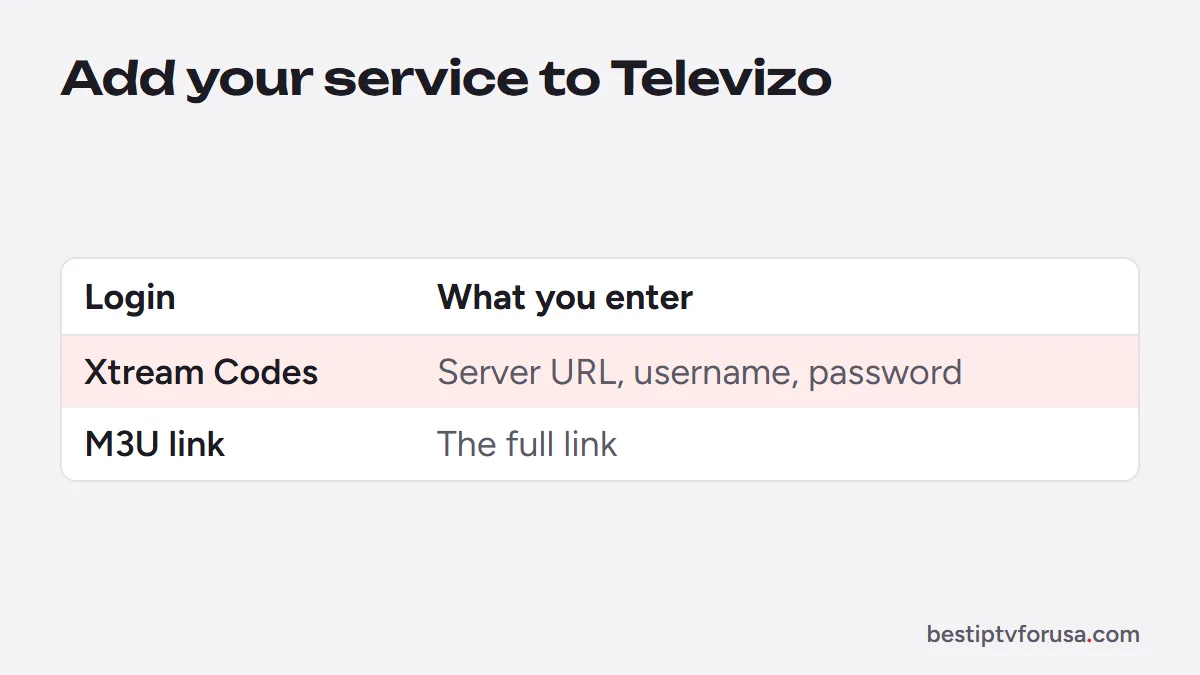
Televizo adds your service as a playlist. Depending on the app version, it offers one or both of the logins in your welcome email:
- Xtream Codes (server URL, username and password). It loads live TV, the guide, movies and series in separate sections, and it is shorter to type with a remote.
- The M3U link. Paste the full link; it works in any player that accepts playlists.
Type each field exactly as written, including http:// and any port number. Our guide to Xtream Codes vs M3U explains the difference, and the field names in the app can change between versions, so follow the labels on screen.
Televizo Premium and the Companion app
Televizo has a free version and a Premium version. Premium is activated through Televizo Companion, which its Google Play listing describes as an account tool that lets you manage your Televizo account, remove devices, edit their names and activate Premium. The listing adds that you do not need Companion if you do not use Televizo.
Premium unlocks app features, not channels: your lineup always comes from your IPTV subscription. Check the current price in the app before buying, since the developer sets it.
Televizo vs TiviMate vs XCIPTV
All three are Android players that sign in with Xtream Codes or M3U. The differences are in the details:
- TiviMate has the most cable-like guide grid and installs from Google Play or with Downloader (code 272483); see our TiviMate Downloader code guide.
- XCIPTV is often handed out by providers in a branded version; see the XCIPTV Player guide.
- Televizo is a light, free player, installed from its official site in 2026.
If you are unsure, try two of them with the same login: with the 24-hour free trial, one screen plays at a time, so switch apps and compare.
Questions people ask
Is Televizo free?
Yes, the player is free to install and use. A Premium version, activated through the Televizo Companion app, unlocks extra features. Your channels always come from your IPTV subscription.
Can I install Televizo on a Firestick?
Yes, on Fire TV models running Fire OS: install the Downloader app, type the code 474318 from Televizo's official site and install. The newest Vega OS sticks cannot install apps this way.
Is there a Televizo app for Windows?
We did not find an official Windows version on Televizo's site. On a computer, use IBO Player or VLC, as our PC and Mac setup guide shows.
Why can't I find Televizo on Google Play?
When we checked in October 2026, the developer's Google Play page listed Televizo Companion but not the player. We do not know why; the official site offers the app file and a Downloader code instead.

Elmer Wenston writes the BestIPTVforUSA guides on IPTV setup, player apps and devices.