
By Elmer Wenston, updated . 5 min read.
The TiviMate PC question has a short answer: TiviMate has no Windows or Mac version. It is an Android app built for TV devices, the kind you control with a remote: Android TV, Google TV and Fire TV. You can run it inside an Android emulator on a computer, with some limits, but the same IPTV service plays more easily in a player made for computers. This guide covers where TiviMate runs, the look-alike apps to avoid and the better options on Windows and Mac.
Where TiviMate runs
TiviMate is distributed for Android-based TV devices. Our TiviMate setup guide covers the usual installs:
- Android TV and Google TV boxes: from Google Play.
- Fire TV: with the Downloader app, from tivimate.com/download.
- Android phones: the app runs, but its menus are designed for a TV screen and a remote.
Its layout explains why there is no computer version: TiviMate is built around a cable-style guide grid that you move through with the arrow keys of a remote. Its developer publishes it for those devices, and on devices without Google Play, such as a Fire TV, Premium is bought through the TiviMate Companion app on an Android phone.
Watch out for look-alike apps
Search for TiviMate in a computer app store and you may find apps with similar names. Those come from other developers and are not TiviMate.
Before you install anything that claims to be TiviMate on a computer:
- Check the developer name and compare it with the developer shown on TiviMate’s Google Play listing and on tivimate.com.
- Read what you would pay for. A subscription inside a look-alike app does not give you TiviMate Premium.
- Avoid modified versions offered on unknown websites, which can carry unwanted software.
TiviMate PC workaround: an Android emulator
An Android emulator is a program that runs Android apps on Windows or Mac. Some people install TiviMate inside one to use it on a computer. It can work, with three limits to know:
- Controls: TiviMate’s menus expect a TV remote. With a mouse and keyboard, the guide is less comfortable than on a TV.
- Performance: live video inside an emulator depends on your computer’s processor and graphics; older laptops can stutter.
- Premium devices: if you activate Premium inside an emulator, expect it to use one of the up to 5 device places on your account; check the current terms on tivimate.com.
Emulators are general-purpose tools, not something TiviMate’s developer provides, so treat this route as a workaround rather than a supported setup.
Better IPTV options on Windows and Mac
If you searched for TiviMate PC because you want IPTV on a computer, a player made for computers is simpler and plays the same IPTV service:
- IBO Player: its developer offers Windows and Mac downloads. You send us the device ID it shows, we activate your playlist, and you get live TV, movies, series and the guide. IPTV Smarters used to fill this role, but its developer’s download site and Google Play listing no longer respond (checked October 2026).
- VLC: the free media player from videolan.org opens your M3U playlist link directly. It has no guide grid, but it is quick and light.
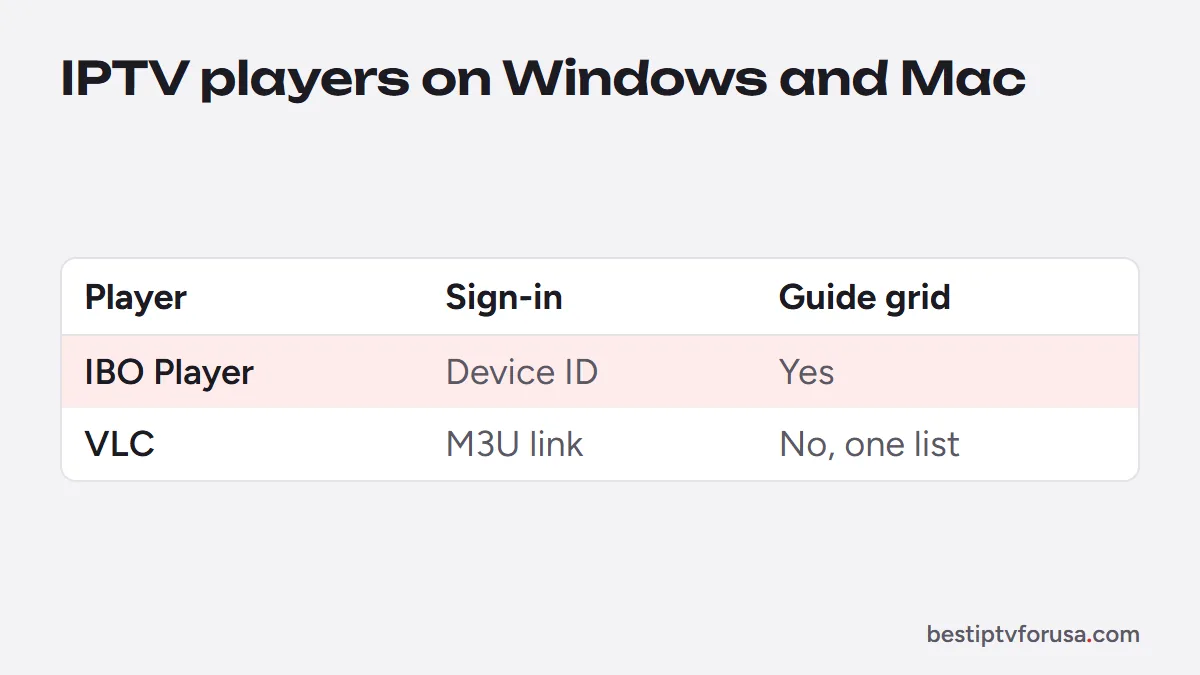
Our PC and Mac setup guide walks through both, and the comparison of the best IPTV player apps covers the other devices in your home.
Which login to use on a computer
Your welcome email contains two kinds of login, and each computer player uses one of them:
- Xtream Codes (server URL, username and password) goes into IPTV Smarters. It loads live TV, the guide, movies and series in separate sections.
- The M3U link goes into VLC, through its option to open a network stream. VLC shows the channels as one list, without a guide grid.
Type each field exactly as it appears in the email, including http:// and any port number in the server URL. If a login is refused, our guide to fixing IPTV Smarters “failed to authorize” lists the usual causes.
TiviMate vs computer players at a glance
| TiviMate in an emulator | IBO Player for Windows or Mac | VLC | |
|---|---|---|---|
| Made for computers | No, an Android TV app | Yes, from its developer | Yes |
| How it signs in | Xtream Codes or M3U | Device ID, activated for you | M3U link |
| TV guide | Full guide grid | Guide in its live TV section | No guide grid |
| Movies and series sections | With Xtream Codes | Yes | No, one list |
| Extra software needed | An Android emulator | None | None |
| Cost | Free version; Premium optional | Trial, then a one-time fee | Free |
For most people the middle column is the practical choice on a computer: it installs like any desktop program and reads the same login as TiviMate on your TV. VLC suits a quick check that your M3U link works, or a light setup on an older laptop.
Watch on the computer and the TV at the same time
Using TiviMate on the TV and another player on the computer works, and both can sign in with the same login. What limits you is the number of screens playing at once in your plan, not the number of apps. If the computer and two TVs play together, that is three connections; our guide to IPTV multiple connections explains how to count them.
Use TiviMate where it shines
TiviMate is at its best on the TV: a Fire TV Stick or an Android TV box connected to the living-room screen, with the remote in hand. That is where its guide grid, favorites and catch-up feel like a cable box. Our guide to TiviMate Premium explains what the upgrade adds there, such as recording.
Try it on your devices
Request a 24-hour free trial: the Xtream Codes login works in TiviMate on your TV and in VLC on your computer as an M3U link, so you can compare both, one at a time, before choosing a plan.
Questions people ask
Can I install TiviMate on a PC?
Not as a Windows or Mac app: TiviMate's developer makes it for Android TV devices. Some people run it inside an Android emulator on a computer, but a player made for computers, such as IBO Player or VLC, is simpler.
Is TiviMate available for Windows 11?
No. There is no Windows version of TiviMate. Any app with a similar name in the Microsoft Store comes from another developer.
Can I use my TiviMate Premium on a computer?
Only inside an Android emulator, where it would likely use one of your Premium device places. Check TiviMate's current terms on tivimate.com before relying on it.
What is the best IPTV app for a PC?
IBO Player has Windows and Mac versions from its developer and is activated with its device ID; VLC plays your M3U link for free. Our PC and Mac setup guide covers both.

Elmer Wenston writes the BestIPTVforUSA guides on IPTV setup, player apps and devices.