
By Elmer Wenston, updated . 4 min read.
TiviMate HTTP data source exception is the message TiviMate shows when it asks a server for something, such as your playlist, the TV guide or a channel, and gets an error back instead. It is not a bug in TiviMate: the app is reporting the server’s answer. The number shown with the message is the useful part. Standard HTTP codes like 401, 403 and 404 have a fixed meaning, while codes like 456 or 458 are defined by each provider. This guide explains both, then gives the fixes in order. It belongs to our troubleshooting guide for IPTV Smarters “failed to authorize”, since many causes are the same in every player.
What TiviMate HTTP data source exception means
Every time TiviMate loads your playlist, refreshes the guide or starts a channel, it sends a web request to your provider’s server. When the server answers with an error status instead of the content, TiviMate shows “HTTP data source exception”, often with the status code.
So the message tells you where the problem is: between TiviMate and the server, for one request. The code tells you why.
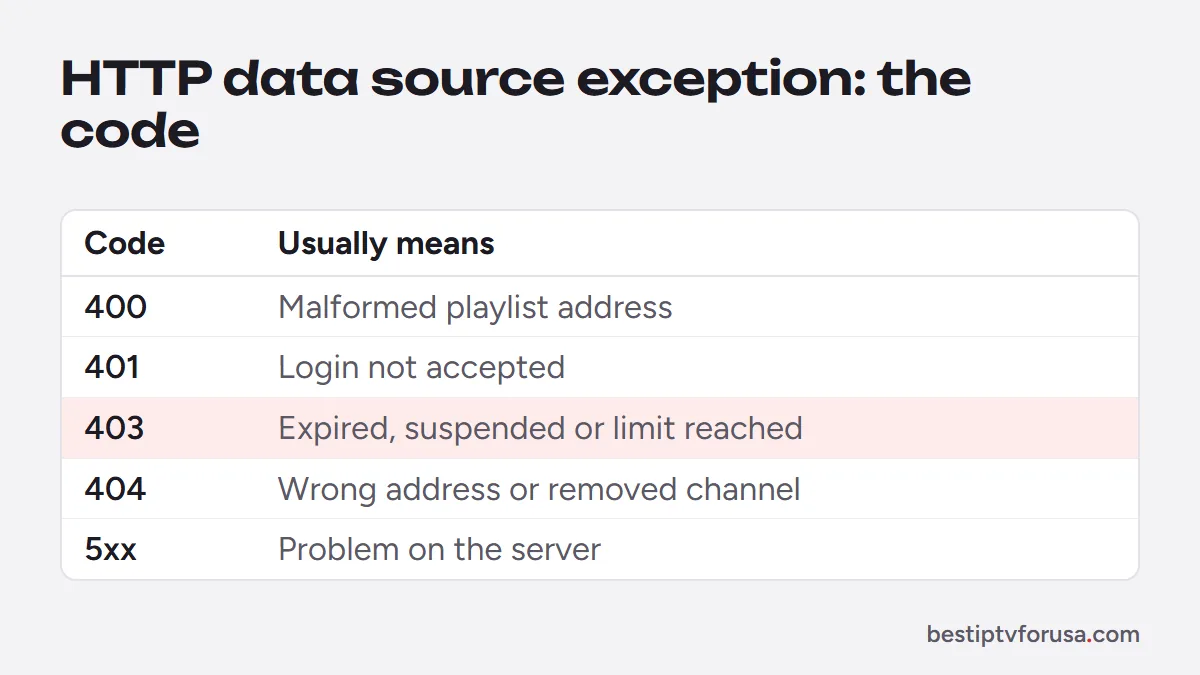
TiviMate error codes and what they mean
Codes from 400 to 599 are defined by the HTTP standard, as summarized by MDN Web Docs. Here is what they usually mean with IPTV:
| Code | Standard meaning | What it usually means with IPTV | First fix |
|---|---|---|---|
| 400 | Bad request | The playlist address is malformed | Re-enter the playlist details from your email |
| 401 | Unauthorized | Username or password not accepted | Retype the login exactly, case included |
| 403 | Forbidden | Account refused: expired, suspended or limit reached | Check the plan’s end date, then contact support |
| 404 | Not found | Wrong or changed address, or a channel removed | Check the server URL; refresh the playlist |
| 5xx (500, 502, 503) | Server error | Problem on the server side | Wait a few minutes; contact support if it lasts |
| 511 | Network authentication required | A network in between asks for a login, such as hotel or public Wi-Fi | Sign in to the network, or use another connection |
Codes such as 456, 458 and 460 are not standard HTTP codes. Their meaning is set by the provider’s server software, so the same number can mean different things with different services. They often relate to the number of connections or the account’s status. Stop playback on your other screens, then ask your provider what the code means on their side.
Fix it step by step
Work through these in order; most errors clear at step 2 or 3:
- Note the exact code and whether it happens on every channel or one.
- Check the login. In TiviMate, open the playlist settings and compare the server URL, username and password with your welcome email, character by character, including http:// and any port number. Our TiviMate setup guide shows where they are.
- Check the plan’s end date in your order email or account.
- Count the screens playing. If more screens play than your plan allows, the extra one is refused.
- Update the playlist. In TiviMate’s playlist settings, use the update option so it reloads the channel list and guide.
- Restart the device and the router.
On a Fire TV
If the error appears only on a Fire TV:
- Clear TiviMate’s cache in Settings, Applications, Manage Installed Applications, TiviMate, Clear cache.
- Free some storage: a nearly full stick struggles to load large playlists and guides.
- Update TiviMate by installing the latest version over the old one with Downloader code 272483; our TiviMate Downloader code guide has the steps.
Errors on the TV guide only
Sometimes channels play but the TV guide shows an HTTP data source exception or stays empty. The guide comes from a separate address (the EPG link), so a guide error does not mean your login is wrong:
- Wait a few minutes after adding the playlist: the guide loads in the background.
- Update the guide from TiviMate’s settings, in the TV guide section.
- Check the guide address if you added one by hand; with an Xtream Codes login, TiviMate loads the guide automatically. Our guide to what an EPG is explains how it works.
How to prevent most TiviMate errors
A few habits keep errors rare:
- Add the playlist with Xtream Codes rather than an M3U link: it is shorter to type and loads the guide and on-demand sections automatically.
- Renew before the end date, so the server never refuses an expired account in the middle of a show.
- Stop playback on devices you are not watching, so you stay within your plan’s screens.
- Keep TiviMate up to date with the same official Downloader code.
When to contact support
If the error stays after these steps, or appears on every device at once, contact your provider’s support with:
- the exact code and message,
- the channel or section where it happens,
- the time, the device and the app.
That is usually enough to find the cause quickly. If every channel fails on every device, run the 2-minute check in Is IPTV down? first, and see our guide to IPTV error codes for the messages other players show.
Questions people ask
What does HTTP data source exception mean in TiviMate?
It means TiviMate requested your playlist, guide or a channel from the server and the server answered with an error. The number next to the message, such as 403 or 404, says which kind of error.
What does error 403 mean in TiviMate?
403 means the server refused the request. With IPTV it usually points to the account: an expired plan, a login typed wrong, or a limit reached. Check the plan's end date and the login, then contact support.
What does error 458 mean in TiviMate?
458 is not a standard HTTP code, so its meaning is set by the provider's server. It often relates to connection limits or account status. Stop playback on other screens, then ask your provider what it means on their side.
Why does TiviMate say failed to get data from server?
TiviMate could not load the playlist or guide: the server address may be wrong, the plan may have ended, or the connection dropped. Check the playlist details against your welcome email and test your internet.

Elmer Wenston writes the BestIPTVforUSA guides on IPTV setup, player apps and devices.