
By Elmer Wenston, updated . 5 min read.
Kodi IPTV works through one official add-on: PVR IPTV Simple Client. Kodi is a free, open-source media center, and the add-on lets it play the live channels of your IPTV service. You paste the M3U playlist URL and the TV guide URL your provider sends you, and the channels appear in Kodi’s TV section with a full guide. You do not need third-party add-ons, builds or repositories. This guide covers the installation on common devices, the add-on settings and the usual fixes.
Kodi and IPTV: what each one does
Kodi and an IPTV service do two different jobs.
| Kodi | IPTV service | |
|---|---|---|
| What it is | A media player and media center | The provider of live channels, guide and on-demand titles |
| Cost | Free, open-source | A paid subscription |
| What it gives you | The screen, the menus and the TV guide view | The channels, through an M3U link or another login |
| Where it comes from | kodi.tv | Your IPTV provider |
So Kodi alone shows nothing live. Once you add your service through PVR IPTV Simple Client, Kodi reads the channel list and the guide your provider publishes and shows them like a cable box.
Install Kodi
Kodi runs on most of the devices in our best IPTV box comparison. Install it only from the official download page, kodi.tv/download, or from the official app store of your device where Kodi is listed. Third-party app stores that repackage Kodi can carry unwanted software.
On a Fire TV, Kodi is not in the Amazon Appstore. The Kodi wiki explains that Fire TV devices run the Android version of Kodi and allow installing apps from outside the store without any modification (Kodi wiki: Install Kodi on Fire TV). The usual route:
- Install Downloader from the Amazon Appstore.
- Turn on Developer options on the Fire TV and allow Downloader to install apps from unknown sources.
- In Downloader, type kodi.tv/download and choose the Android version that matches your device.
- Let the installer open, then select Install.
Our Downloader codes guide explains the Downloader app in more detail. On Android TV boxes, Windows, Mac and other systems, follow the matching section of the kodi.tv download page.
Add IPTV with PVR IPTV Simple Client
PVR IPTV Simple Client is the official add-on maintained in Kodi’s own repository. Its documentation describes it as a “Live TV and Radio PVR client addon” that reads an M3U playlist and an XMLTV guide (PVR IPTV Simple Client on GitHub).
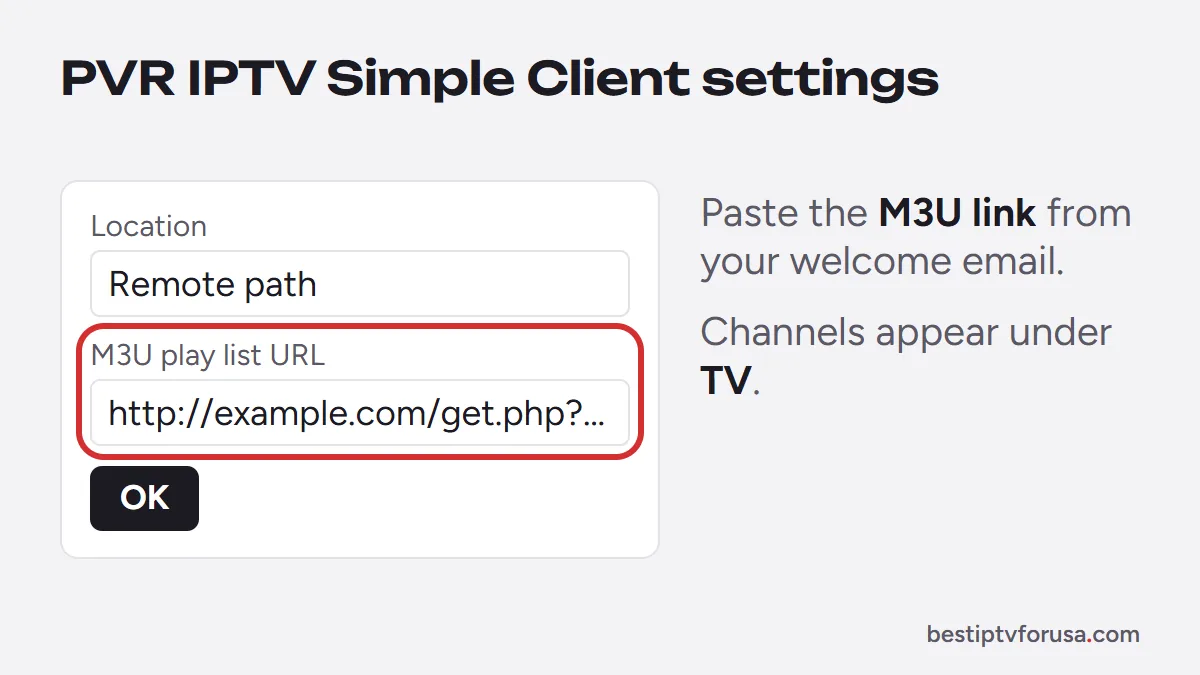
To add your service:
- In Kodi’s add-ons section, install PVR IPTV Simple Client from the official Kodi add-on repository if it is not installed yet.
- Open Configure.
- In the add-on settings, set the playlist Location to Remote path.
- Paste your M3U play list URL, the M3U playlist link from your provider’s welcome email. The add-on documentation states that this field must contain a valid URL for the add-on to work.
- Enable the add-on if it is not already enabled, then return to the Kodi home screen.
Your channels appear under TV. Some settings only show at higher settings levels: if you cannot find one, switch the settings level from Basic to Standard, Advanced or Expert.
Load the TV guide in Kodi
The TV guide comes from a separate XMLTV link from your provider. It is not always in the welcome email next to the M3U link, so ask your provider’s support for it if you do not have it. In the same add-on settings:
- Open the EPG section.
- Set Location to Remote path.
- Paste the XMLTV URL from your provider.
- If programs appear at the wrong time, use EPG time shift, which the documentation says accepts -12 to +14 hours.
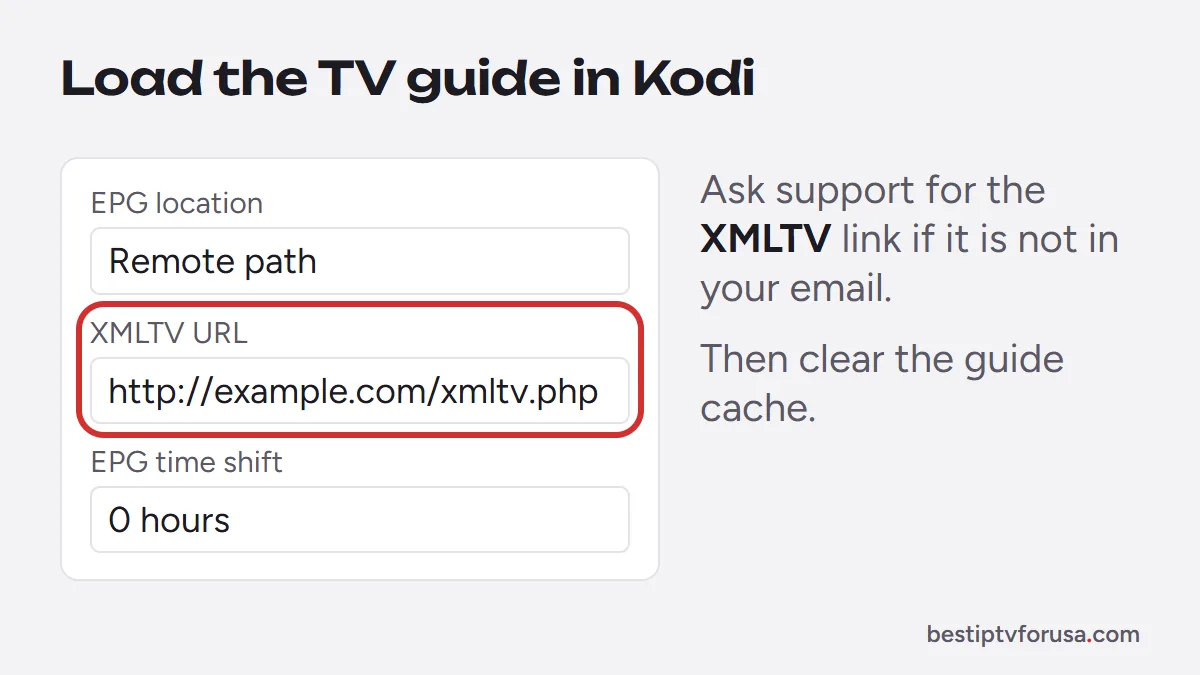
After changing guide settings, clear Kodi’s guide cache so it reloads: Settings, PVR & Live TV, Guide, Clear cache, as the add-on documentation recommends. If your provider supports catch-up, turn on Enable catchup in the add-on settings to restart programs that already began. Our guide to the IPTV EPG explains how the guide data works.
Kodi vs a dedicated IPTV player
Kodi suits people who already use it for their own videos or who like to customize everything. For live TV alone, a dedicated IPTV player is usually simpler:
- Setup: dedicated players sign in with one Xtream Codes login or a device ID and load the guide on their own; Kodi needs two links and a few settings.
- Remote control: apps such as IBO Player Pro and TiviMate are built around the TV remote.
- Guide: TiviMate shows a cable-style guide grid out of the box.
Our comparison of the best IPTV player apps covers each option by device. Both routes use the same IPTV service, so you can try Kodi and a dedicated player with the same subscription.
Stay on official add-ons
Kodi itself is ordinary open-source software. Problems usually come from what people add to it: unofficial add-ons, preconfigured “builds” and unknown repositories. Those packages can carry malware, slow the device down or stream content without permission from its owners. For that reason, install add-ons only from the official Kodi repository.
If you keep to Kodi from kodi.tv and PVR IPTV Simple Client from the official repository, you only add what you control: your own provider’s links. For the wider question of which IPTV services to trust, see is IPTV legal in the USA.
Common Kodi IPTV problems
Running a Jellyfin server instead? Our Jellyfin IPTV guide adds your playlist as an M3U Tuner.
| Problem | Likely cause | Fix |
|---|---|---|
| No channels under TV | Add-on disabled or M3U URL wrong | Check the add-on is enabled and the URL is complete |
| Guide is empty | No XMLTV URL, or old cache | Add the XMLTV URL, then clear the guide cache |
| Programs at the wrong time | Time zone offset in the guide | Adjust EPG time shift |
| Channels stop or buffer | Connection or device speed | Use Ethernet or 5 GHz Wi-Fi; see the buffering guide |
For buffering, the IPTV buffering fixes apply to Kodi as well. To test the whole setup at no cost, request a 24-hour free trial: the welcome email includes the M3U link to paste into PVR IPTV Simple Client, and support can tell you where to find the guide link.
Questions people ask
Can I use Kodi for IPTV?
Yes. Install the official PVR IPTV Simple Client add-on, enter the M3U playlist URL and the XMLTV guide URL from your IPTV provider, and your channels appear under TV in Kodi.
Is there a monthly fee for Kodi?
No. Kodi is free, open-source software. The IPTV service you watch in it is a separate subscription from your provider.
What is the difference between Kodi and IPTV?
Kodi is a player: it shows video and a TV guide. IPTV is the service that sends the channels over the internet. Kodi needs an IPTV service, through an add-on like PVR IPTV Simple Client, to show live channels.
Is Kodi better than a dedicated IPTV player?
Kodi is flexible and also plays your own videos, but it takes more setup. A dedicated player such as TiviMate or IBO Player Pro signs in faster and is easier to use with a TV remote.

Elmer Wenston writes the BestIPTVforUSA guides on IPTV setup, player apps and devices.