
By Elmer Wenston, updated . 4 min read.
The best IPTV app for Samsung TV, for most homes, is IBO Player Pro. Samsung TVs run Tizen, so you install IPTV players from the Samsung app store, and the most practical ones are activated with your TV’s device ID: you send us the ID and we add your playlist, so nobody types a long login with the remote. Hot Player, Set IPTV and ELK Player work the same way. This guide compares them, explains what “free” means on a Samsung TV and covers older models. It is part of our guide to the best IPTV box, which compares smart TVs with streaming sticks and boxes.
Best IPTV app for Samsung TV: the options compared
All four players below show the channels from your IPTV subscription; none of them comes with channels. They differ mainly in how you sign in and what they cost:
| App | How you sign in | Typing with the remote | Cost (set by its developer) |
|---|---|---|---|
| IBO Player Pro | Device ID and key, activated for you | None | Free trial, then a one-time fee per TV |
| Hot Player | MAC address on its first screen, activated for you | None | Free period, then a small license fee |
| Set IPTV | MAC address, playlist added on its website | None on the TV | 7-day free trial, then a small one-time fee |
| ELK Player | Device ID and key, activated for you | None | 14-day free trial, then a one-time fee |
Hot Player’s developer lists the Samsung TV store among the places to download it (hotplayer.app), and IBO Player Pro’s developer lists LG and Samsung TVs on its official app store (ibo.al). Store listings can vary by TV model and year, so search the app name on your own TV.
Is there a good free IPTV app for Samsung TV?
Not in the sense of free forever. The players that work well on a Samsung TV start with a free trial or free period, then charge a one-time fee for that TV, paid to the app’s developer. That fee is separate from your IPTV plan, and it is usually small compared with a month of cable.
What you do get for free is the test: install the app, use its trial, and request our 24-hour free trial to see your channels, TV guide and movies on your own Samsung TV before paying anyone.
How to install an IPTV app on a Samsung TV
The steps are the same for every app in the table:
- Update the TV. Open Settings, then Support, then Software Update. Samsung’s support site explains the update for your model.
- Open Apps. Press Home on the remote and select Apps.
- Search for the player by name, select it and choose Install.
- Open it and note the device ID (or MAC address) on its first screen.
- Send it to us. We activate your playlist, usually within minutes; restart the app and your channels load.
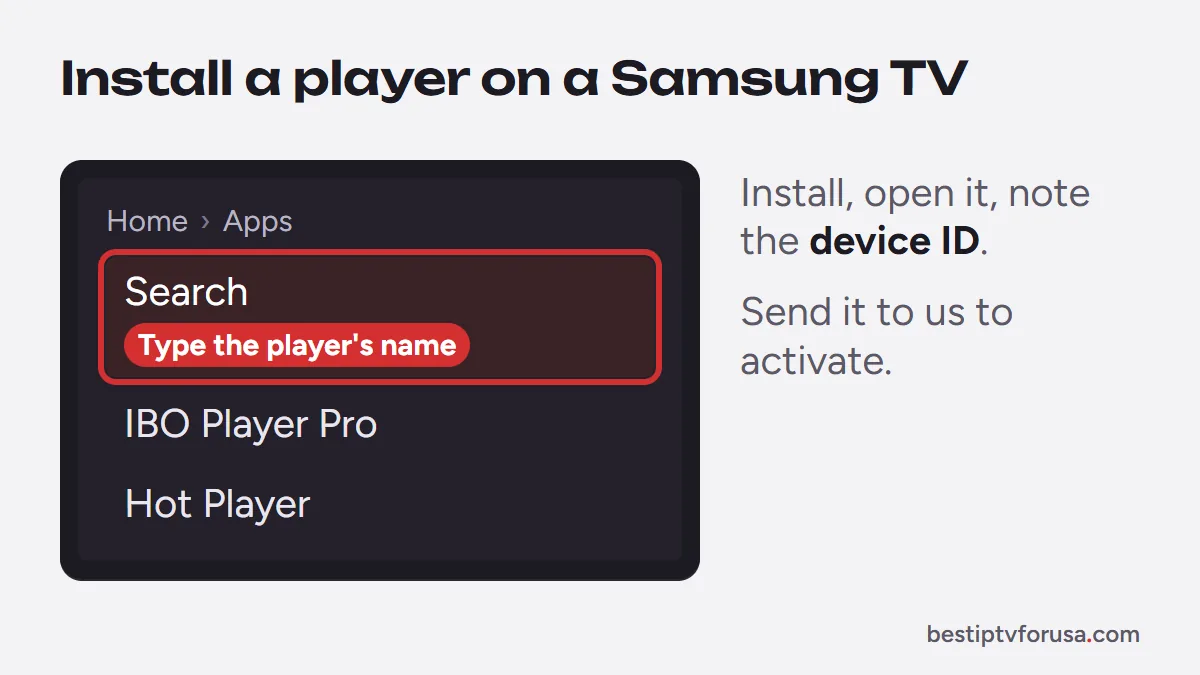
Our Samsung and LG smart TV guide has the full steps, and the IBO Player Pro and Hot Player guides cover each app.
Where IPTV Smarters Pro stands on Samsung
Older guides and lists often name IPTV Smarters Pro as the best Samsung app. Samsung’s US app store still has a page for it, and its description says that IPTV providers must register their server with the developer for the app to work with their service (Samsung app store listing). On other devices, the developer’s download site no longer responded when we checked in October 2026.
Since setup depends on that registration, we recommend the device-ID players above on a Samsung TV. Several apps with “Smarters” in the name also appear in TV stores, from different developers, so check the developer before installing. Our guide to IPTV Smarters Pro not working explains the situation in detail.
Older Samsung TVs and other options
Samsung TVs from before roughly 2018 may not have current players in their store, or may run them slowly. If the app you want is missing:
- Check for a software update first, then search again.
- Plug in a streaming stick. A Fire TV Stick or a Google TV device adds every major player, including TiviMate, which does not run on Tizen. Our guide to IPTV on Google TV and our Fire TV vs Google TV comparison help you choose.
- Use an Android TV box if you want the widest choice of apps; see our guide to the best Android TV box for IPTV.
LG and other smart TVs
LG TVs run webOS, and most of the same players are in the LG Content Store, with the same device-ID activation; our guide to the best IPTV app for LG TV compares them. Hisense TVs running VIDAA use Hot Player from the VIDAA App Store. Both are covered in our smart TV setup guide.
Whichever app you pick, the quickest way to know if it suits your TV is to try it: install it, send us the device ID and request the 24-hour free trial.
Questions people ask
Which IPTV app is best for Samsung TV?
For most homes, IBO Player Pro: you send us the device ID it shows and we activate your playlist, so nobody types a login with the remote. Hot Player, Set IPTV and ELK Player work the same way and are good alternatives.
Is there a free IPTV app for Samsung TV?
The main players start free, with a trial period, then charge a one-time fee per TV paid to their developer. Your channels always come from your IPTV subscription, which is separate.
Can I install APK files on a Samsung TV?
No. Samsung TVs run Tizen, not Android, so they only install apps from the Samsung app store. Android apps such as TiviMate do not run on them.
How do I add an M3U playlist on a Samsung TV?
With an app activated by device ID, you send us the ID and we add the playlist for you. Apps that accept an M3U link let you paste it from their website or settings, using the link in your welcome email.
Does IPTV work on old Samsung TVs?
Often not directly: older models, roughly before 2018, may not have the current apps in their store. Plugging in a Fire TV or Google TV stick is the simplest fix.

Elmer Wenston writes the BestIPTVforUSA guides on IPTV setup, player apps and devices.