
By Elmer Wenston, updated . 5 min read.
The best IPTV app for Firestick is IBO Player Pro if you want no typing, and TiviMate if you want the fullest TV guide. ELK Player works like IBO Player Pro, and Hot Player is the one you can install straight from the Amazon Appstore. IPTV Smarters Pro, long a free favorite, no longer has a working official download. All of them are players: they show the channels of the IPTV service you sign in to and come with none of their own. This guide compares them on a Fire TV only; for other devices, see our comparison of the best IPTV player apps, and for the other ways to watch live channels on a Fire TV, see live TV apps for Firestick.
The 5 best IPTV apps for Firestick compared
| App | How it installs on Fire TV | How it signs in | Price | Best for |
|---|---|---|---|---|
| IBO Player Pro | Downloader app and code | Device ID, activated by your provider | 7-day free trial, then about $8 once for that device | Nobody typing with the remote |
| TiviMate | Downloader, from tivimate.com/download | Xtream Codes or M3U | Free version; Premium about $10 a year or $35 lifetime, up to 5 devices | A cable-style guide grid |
| IPTV Smarters Pro | No working official download (checked October 2026) | Xtream Codes | Free | Already installed only |
| ELK Player | Downloader app and code | Device ID and key, activated by your provider | 14-day free trial, then about €6 once for that device | Device activation, like IBO |
| Hot Player | Amazon Appstore | MAC address, activated by your provider | Free period, then a small license fee | No sideloading at all |
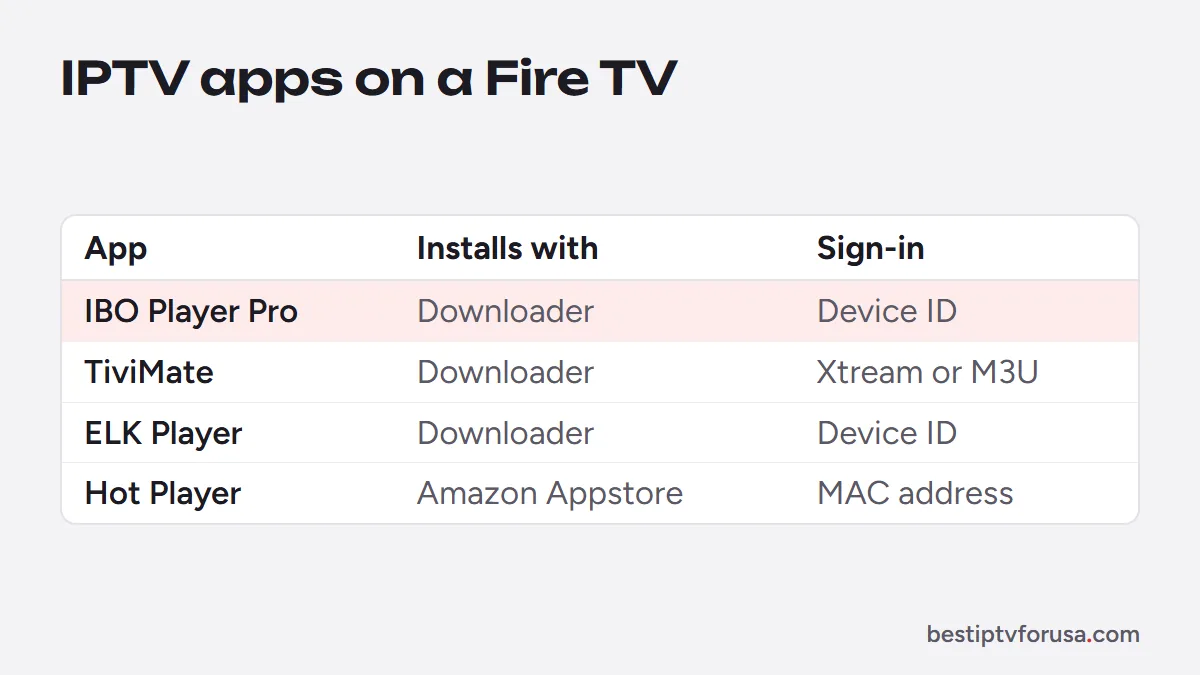
The table compares each app on the three things that matter on a Fire TV: how it installs, how it signs in and what it costs after any trial. Prices are set by each app’s developer and can change; check them in the app before you pay. Whatever app you choose, your IPTV plan stays the same: you can switch apps without changing provider.
IBO Player Pro: no typing with the remote
IBO Player Pro is the easiest app for a household where not everyone is comfortable with technology. On first launch it shows a device ID. You send that ID to your provider, the provider adds your playlist to it, and the channels appear the next time the app opens. Nobody types a server address or a password with the remote.
After a 7-day free trial, IBO Player Pro costs about $8 once for that device. It is the app our Firestick setup guide lists first for that reason.
TiviMate: the fullest TV guide
TiviMate looks the most like a cable box: channels down the side, times across the top, favorites and catch-up from the grid. It signs in with the Xtream Codes login from your welcome email or with an M3U link. With Xtream Codes, the TV guide loads on its own; with an M3U link, you may need to add the separate guide link from your provider.
The free version plays your channels and guide. TiviMate Premium, about $10 a year or $35 for a lifetime license on up to 5 devices, adds features such as recording; current terms are on tivimate.com. Our guide to TiviMate Premium covers what the upgrade includes and how to activate it on a Fire TV.
IPTV Smarters Pro: no longer available to install
IPTV Smarters Pro was the free all-rounder on Fire TV for years, but its developer’s download site and Google Play listing no longer respond (checked October 2026), and its Downloader code pointed to that site. Avoid copies from APK sites or look-alike apps with a similar name. If you want a free app, use the free version of TiviMate; if Smarters Pro is already on your Fire TV, it signs in with the same Xtream Codes login.
Like every player, it has no channels of its own: the app and the IPTV subscription are two separate things, as our guide to the IPTV Smarters Pro subscription explains.
ELK Player and Hot Player
ELK Player works like IBO Player Pro: it shows a device ID and key that your provider activates. After a 14-day free trial, it costs a one-time fee of about €6 (charged in euros) for that device. It is a good alternative if you prefer its layout.
Hot Player is activated with the MAC address shown on its first screen, and it is the only one of the five you install from the Amazon Appstore instead of with Downloader. That makes it the simplest option if you would rather not change any Fire TV settings. After a free period, it asks for a small license fee. Because its activation is based on a MAC address, as on a MAG box, our STBEmu MAC address guide explains what that address does.
How to install an IPTV app on a Firestick
Check your model first. The Fire TV Stick 4K Select and the newest Fire TV Stick HD run Amazon’s Vega OS, which only installs apps from the Amazon Appstore (AFTVnews); on those sticks, Hot Player from the Appstore is the route to try. On Fire OS models, such as the Fire TV Stick 4K Plus and 4K Max, four of the five apps install with Downloader, a free app from the Amazon Appstore:
- Install Downloader from the Amazon Appstore.
- Turn on Developer options on the Fire TV and allow Downloader to install apps from unknown sources.
- Type the code or address of the app you want. Our Downloader codes for IPTV player apps list the current codes; TiviMate also installs from tivimate.com/download.
- Install, open the app and sign in with the login or device ID from your provider.
For Hot Player, search for it in the Amazon Appstore and install it like any other app. The full walk-through, with every screen, is in the Firestick setup guide.
Which app should you pick?
- For parents or grandparents: IBO Player Pro. Device activation means nothing to type, and the menus are simple.
- For people who live in the TV guide: TiviMate. The grid feels like cable, and Premium adds recording.
- For a free app: the free version of TiviMate.
- For no sideloading at all: Hot Player from the Amazon Appstore.
- For several Fire TVs in one house: TiviMate Premium’s lifetime license covers up to 5 devices.
The app is only half of the picture. For the service itself, see the best IPTV for Firestick, then test it with a 24-hour free trial in the app you chose.
Questions people ask
Which IPTV app is better for Firestick?
IBO Player Pro if you want no typing with the remote, TiviMate if you want the fullest TV guide, and the free version of TiviMate if you want to pay nothing for the app.
Is there a free IPTV app for Firestick?
Yes. The free version of TiviMate costs nothing; IBO Player Pro and ELK Player have a free trial, then a small one-time fee; Hot Player has a free period, then a small license fee. The channels always come from your IPTV service, which is a separate subscription.
Can I use one IPTV login in several apps?
Yes. An Xtream Codes login works in TiviMate, and your provider can activate the device ID of IBO Player Pro or ELK Player for the same line. Watching on several screens at once depends on the number of screens in your plan.
What is the best Firestick model for IPTV?
A Fire TV Stick 4K model is the comfortable choice for 4K TVs, and an Ethernet adapter helps if the Wi-Fi is weak. Our guide to the best IPTV box compares Fire TV with the other devices.

Elmer Wenston writes the BestIPTVforUSA guides on IPTV setup, player apps and devices.