
By Elmer Wenston, updated . 5 min read.
The STBEmu MAC address is the address of the set-top box the app pretends to be. You find it in Settings, then Profiles, your profile, STB configuration, MAC address, send it to your IPTV provider, and enter the portal URL they reply with. That is the whole activation. The steps below follow the official STBEmu documentation (STBEmu docs: STB profiles), so the menu names match what you see on screen.
What the MAC address does in STBEmu
STBEmu, short for STB Emulator, is an Android app that imitates a MAG set-top box. Its documentation lists the MAG 250, MAG 270 and MAG 322 among the models it emulates. A MAG box signs in to an IPTV service with two things: a portal URL and its MAC address. STBEmu does the same.
The MAC address acts like the box’s ID card. Your provider adds it to your line on their portal, and from then on the portal recognizes your device and sends it your channels, TV guide and on-demand titles. Nothing is typed at login: the portal checks the MAC address every time the app connects.
According to the STBEmu documentation, most portals require a MAC address that starts with 00:1A:79, the prefix used by MAG boxes. That is why STBEmu generates addresses in that range.
How to find your STBEmu MAC address
The official path, from the STBEmu documentation:
- Open STBEmu and bring up its menu; the documentation describes a double tap on the screen.
- Select Settings.
- Select Profiles, then the profile you use. STBEmu creates one profile the first time it starts.
- Open STB configuration.
- Read the MAC address field.
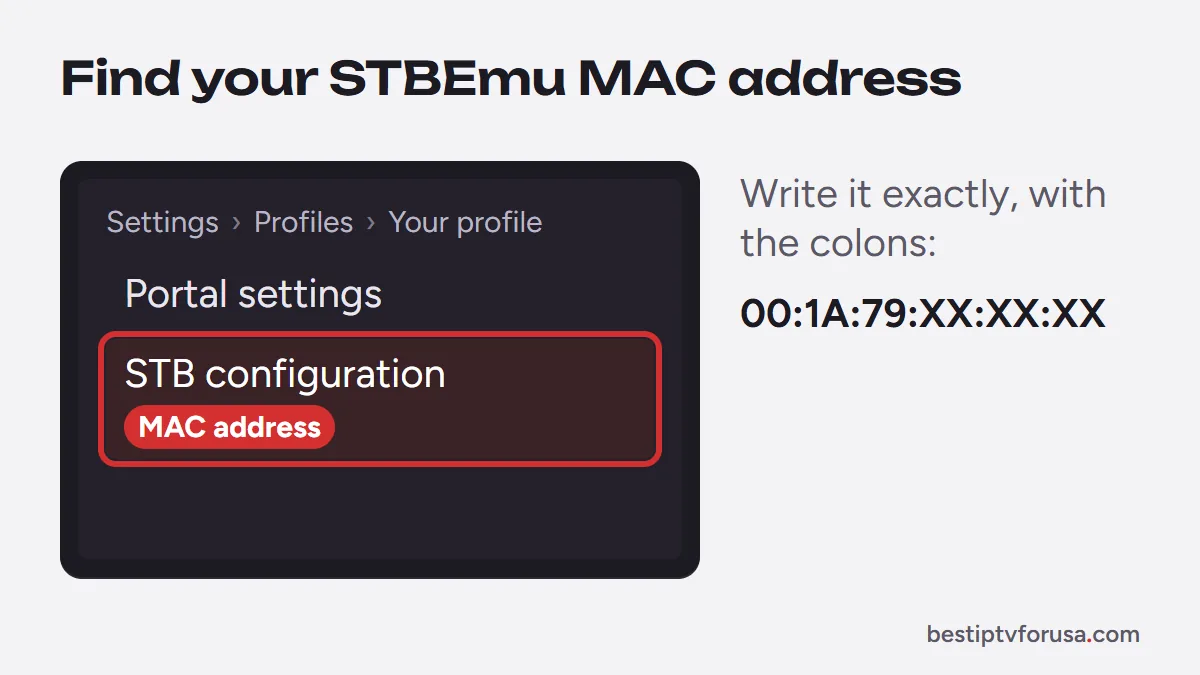
Write the address down exactly, with the colons, for example 00:1A:79:XX:XX:XX. A single wrong character means the portal will not recognize your device.
When and how to change it
Most of the time you keep the address STBEmu shows. Change it only in two cases:
- The address ends in 00:00:00. The documentation notes that on some Wi-Fi-only devices STBEmu shows 00:1A:79:00:00:00. Replace the last three pairs with other hexadecimal characters (0 to 9 and A to F), keeping the 00:1A:79 start.
- Your provider gave you a specific address. Type it in the same field.
After any change, send the new address to your provider before you try to connect. The portal only knows the address it has on file, so a changed MAC needs to be registered again. Use one address per device: two devices with the same MAC address conflict on the portal.
Activate IPTV: portal URL and MAC
Activation takes two messages and one setting:
- Send your MAC address to your provider. At BestIPTVforUSA, you send it with your free trial request or after you buy a plan, and support registers it on your line.
- Receive the portal URL. It looks like a web address and must start with http:// or https://, as the STBEmu documentation specifies.
- Enter it in STBEmu: Settings, Profiles, your profile, Portal settings, Portal URL.
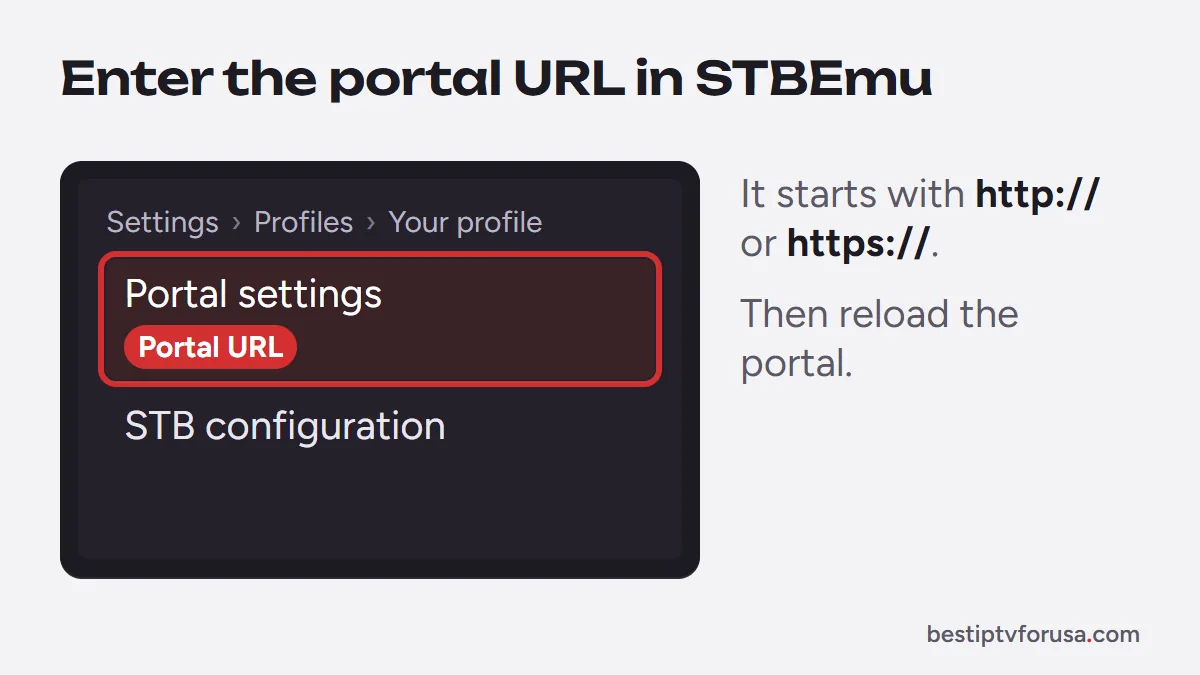
Go back and reload the portal, or restart the app. STBEmu connects to the portal, which recognizes your MAC address and loads your channel list and guide. Because each profile holds its own portal and MAC address, you can keep several profiles on one device, for example a trial and a paid line. Our MAG and STBEmu setup guide shows the same fields for a real MAG box.
STBEmu Free vs Pro
The STBEmu documentation lists two versions, both on Google Play: StbEmu Free and StbEmu Pro. The only major difference, according to the STBEmu download page, is that the Free version shows ads and Pro does not. Both need Android 8.0 or later, according to the STBEmu documentation and are designed for Android phones, tablets and TV boxes.
The documentation does not mention Fire TV. Some owners install Android apps on Fire TV devices, but since the developer does not list it, test the app before you rely on it there. If you watch on a Fire TV, an app covered in our best IPTV app for Firestick comparison is the simpler route, for example Hot Player, which is activated with a MAC address and installs from the Amazon Appstore. Our guide to IPTV login types explains which apps use a MAC address and which use Xtream Codes.
Why shared MAC lists are a bad idea
Searches for STBEmu MAC addresses often lead to lists of addresses and portal links shared online. Avoid them. Each of those addresses is registered to somebody’s line, so using one means watching on an account that is not yours. Those entries stop working without warning, offer no support and can lead to scams and to apps carrying unwanted software.
The safe route is simple: use the MAC address your own app shows and register it with a provider you pay. Our list of IPTV scam red flags covers the other warning signs.
STBEmu MAC address not working: quick fixes
| What you see | Likely cause | Fix |
|---|---|---|
| The portal does not load your channels | MAC address not registered yet | Send the exact address to your provider and wait for confirmation |
| Portal refuses this device while another one plays | Same MAC address on another device | Give this device its own address and register it |
| Portal refuses the address | Address does not start with 00:1A:79 | Use an address in the 00:1A:79 range, then register it |
| Nothing loads at all | Typing error in the portal URL | Check the full URL, including http:// and any port number |
| Address ends in 00:00:00 | Default on some Wi-Fi-only devices | Change the last three pairs, then register the new address |
If the portal still refuses to load, send your provider a screenshot of the STB configuration screen with the MAC address visible. The MAG box guide covers the same checks for a hardware box.
Questions people ask
How do I find the MAC address for IPTV in STBEmu?
Open the STBEmu menu, then Settings, Profiles, choose your profile and open STB configuration. The MAC address field shows the address of the box STBEmu emulates. Send that address to your IPTV provider.
Can I use the same MAC address on two devices?
Not at the same time. The portal links one line to one MAC address, so two devices with the same address conflict, and the portal may refuse one of them. Give each device its own MAC address and register each one with your provider.
What is a FF:FF:FF:FF:FF:FF MAC address?
It is the broadcast address used on local networks to reach every device at once, not the address of a single device. A portal cannot register it for a line, so set a normal address starting with 00:1A:79 in STBEmu instead.
Where is the MAC address on a MAG or Formuler box?
On a MAG box it is in the system settings and on the label under the box. On a Formuler box it is shown in the box settings. In each case, send it to your provider before entering the portal URL.

Elmer Wenston writes the BestIPTVforUSA guides on IPTV setup, player apps and devices.