
By Elmer Wenston, updated . 4 min read.
A MAG box is a set-top box built only for IPTV, made by Infomir. Unlike a streaming stick, it has no player app to choose: it connects to your provider through a portal, a web address linked to the box’s MAC address. You send the MAC address, receive the portal URL, enter it once, and the box shows your channels, TV guide and on-demand library. It is one of the five main options in our guide to the best IPTV box.
How a MAG box works
Three pieces make it run:
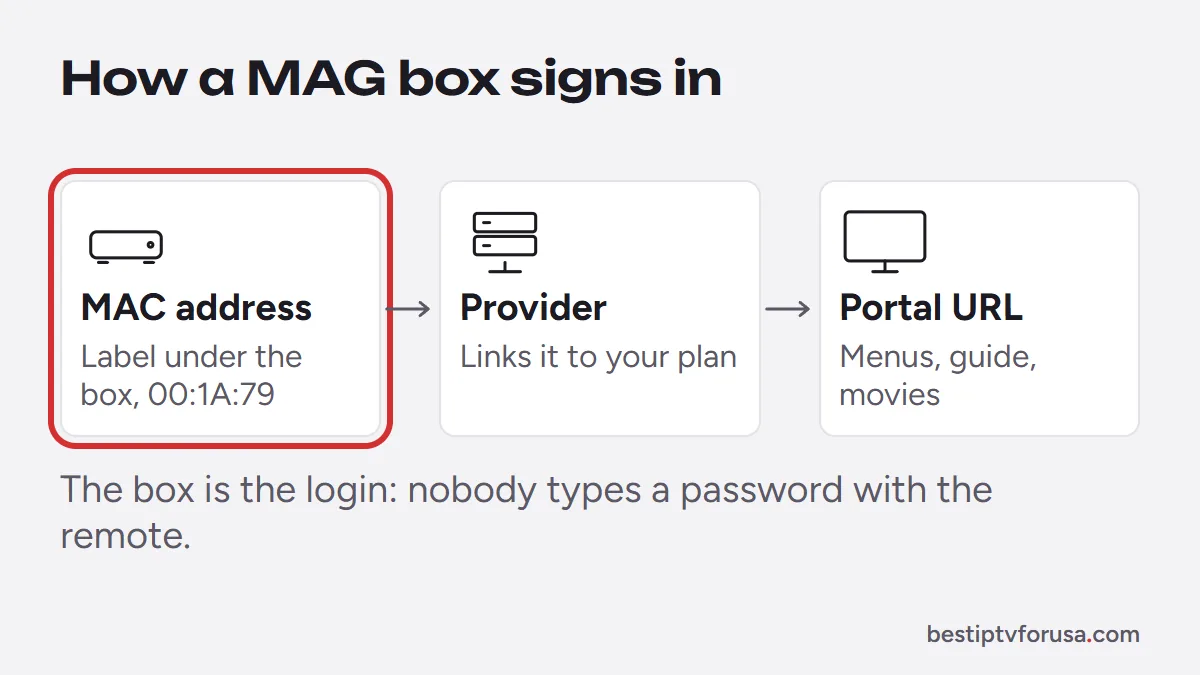
- The MAC address: a unique ID printed on the label under the box, starting with 00:1A:79. It tells the provider which box is yours.
- The portal URL: an address the provider gives you after linking your MAC address to your subscription.
- The portal itself: the menus, TV guide and on-demand screens you see come from the portal rather than from an app on the box.
Because the login is the box itself, nobody has to type a username or password with the remote. This is a different login type from Xtream Codes or an M3U link; our guide to Xtream Codes vs M3U compares all of them.
How to set up IPTV on a MAG box
- Find the MAC address on the label under the box, or in Settings, then System Settings.
- Send it to your provider. With BestIPTVforUSA, email it to support or include it when you order or start your trial.
- Receive your portal URL by email once the MAC address is registered.
- Enter the portal URL in System Settings, then Servers, then Portals, and save.
- Restart the box. The portal loads with your channels and guide.
The MAG box setup guide shows each screen. Plan about 10 minutes the first time.
MAG box pros and cons
| Pros | Cons |
|---|---|
| Built for TV only, with simple remote-driven menus | Works only with providers that offer a MAG portal |
| Ethernet port for a wired connection (check the model) | Built mainly for IPTV; check the model for other apps |
| No player app license to buy | The look and features depend on the portal |
| Nothing to type: the box is the login | Moving to a new box means sending a new MAC address |
Who should choose a MAG box?
A MAG box suits households that want TV to feel like a cable box: turn it on, pick a channel, nothing else. It is a good choice for older family members or a second TV that only ever shows live channels. If you also want other streaming apps, games or a choice of player, a Fire TV Stick, an Android TV box or a Formuler box is more flexible.
MAG box vs Formuler vs STB Emulator
| MAG box | Formuler box | STB Emulator | |
|---|---|---|---|
| What it is | Dedicated IPTV box by Infomir | Android-based box with MyTVOnline | An app for Android devices and Fire TV |
| How you sign in | MAC address and portal | Xtream Codes in MyTVOnline | MAC address and portal, like a MAG |
| Other apps | Limited; depends on the model | Yes, Android apps | Yes, it runs on a general device |
| Best for | Simple, TV-only viewing | A full guide plus other apps | Trying the MAG setup without buying a MAG |
Formuler boxes come with MyTVOnline, which signs in with the server URL, username and password from your welcome email. STB Emulator turns an Android device into a MAG-style box: it shows a MAC address in its configuration, and the setup continues exactly like a MAG.
What to check before buying a MAG box
- Your provider offers a MAG portal. A MAG box needs a portal to work; ask before you buy. Every BestIPTVforUSA plan includes one.
- 4K output, if your TV is 4K. Check the model’s specifications for 4K support before buying for a 4K TV.
- An Ethernet cable run to the TV. The box has a port; a wired connection keeps live TV steady.
- A free HDMI input on the TV. The box connects by HDMI.
- Who will use it. If the household also wants other streaming apps, an Android TV box or a Formuler box covers both. Our guides to the Formuler Z10 and the Formuler Z12 and Z11 models compare the current boxes.
Keep the box’s label visible or note the MAC address somewhere safe: you will need it again if you ever move your subscription or contact support.
Common MAG box problems and fixes
| Problem | Likely cause | Fix |
|---|---|---|
| “Portal not available” | Typo in the portal URL, or MAC not yet registered | Check the URL, confirm the MAC was registered, restart |
| Channels load, guide is empty | Guide still loading | Wait a few minutes, then reload the portal |
| Box worked, now shows an error | Subscription ended or network change | Check your end date, restart the router and the box |
| New box shows nothing | Portal still linked to the old box | Send the new MAC address to support |
If the problem is not on this list, our step-by-step guide for when IPTV is not working helps narrow it down.
Try it on your MAG box
Send your MAC address with a 24-hour free trial request and test the portal on your own TV. Every IPTV subscription plan works on a MAG box, Formuler or STB Emulator.
Questions people ask
What is a MAG box?
A set-top box made by Infomir and built for IPTV. It connects to your provider through a portal address linked to the box's MAC address, so there is no player app to install.
Where do I find the MAC address on a MAG box?
On the label under the box, and in Settings, then System Settings. MAG MAC addresses start with 00:1A:79.
How do I set up IPTV on a MAG box?
Send your provider the MAC address, enter the portal URL you receive in System Settings, then Servers, then Portals, save and restart the box.
Can I move my subscription to a new MAG box?
Yes. Send the new box's MAC address to support and the portal link is moved to it.
Is a MAG box better than a Fire TV Stick for IPTV?
It is simpler for people who only want TV, with a remote-driven menu and built-in Ethernet. A Fire TV Stick or Android box is more flexible, with a choice of player apps and other streaming apps.

Elmer Wenston writes the BestIPTVforUSA guides on IPTV setup, player apps and devices.