
By Elmer Wenston, updated . 5 min read.
IPTV vs cable comes down to how the picture reaches your TV. Cable sends channels through a coaxial line to a box your provider rents you. IPTV sends them over your home internet to a player app on a smart TV, a streaming stick, a phone or a computer. For most US households IPTV costs much less and has no contract; cable keeps one advantage, which is that it does not depend on your internet connection. If you are new to the technology, our guide to what IPTV is and how it works explains the basics.
IPTV vs cable at a glance
| IPTV (BestIPTVforUSA) | Cable or satellite TV | Live TV streaming apps | |
|---|---|---|---|
| Monthly cost | $4.17 to $10 for one screen | Median $125 (doxo, 2026) | A monthly subscription per app |
| Contract | None, nothing renews on its own | Often a term contract | Usually monthly, renews automatically |
| Equipment | The TV, stick or phone you own | A rented box for each TV | The TV, stick or phone you own |
| Screens | 1 to 6 at the same time | One per box | Set by each app |
| Watch away from home | Yes, no IP lock | Limited to the provider’s app | Often limited by location |
| Depends on home internet | Yes | No | Yes |
| Setup | Install a player app and sign in | Installer visit or self-install kit | Install the app and sign in |
The cable figure comes from a 2026 doxo report that found US households pay a median of $125 a month for cable and satellite TV (Broadband Breakfast, August 2026). IPTV prices are covered in detail in how much IPTV costs.
Cost: where IPTV saves the most
The gap is large. A one-year IPTV plan for one screen costs $75 with BestIPTVforUSA, less than one typical month of cable at the $125 median. Cable bills also tend to grow over time with box rental, regional fees and the end of promotional prices.
IPTV has a few costs of its own to budget for: some player apps charge a one-time license per device, and an old TV may need a streaming stick. Even with those, the yearly total stays well below a typical cable bill.
Contracts and cancelling
Cable plans often come with a contract and an early termination fee. Our IPTV plans are paid for a fixed period with no contract. With BestIPTVforUSA nothing renews automatically: the service ends when your period ends unless you choose to renew, and a 48-hour refund applies if the service does not work on your device and support cannot fix it.
Equipment and screens
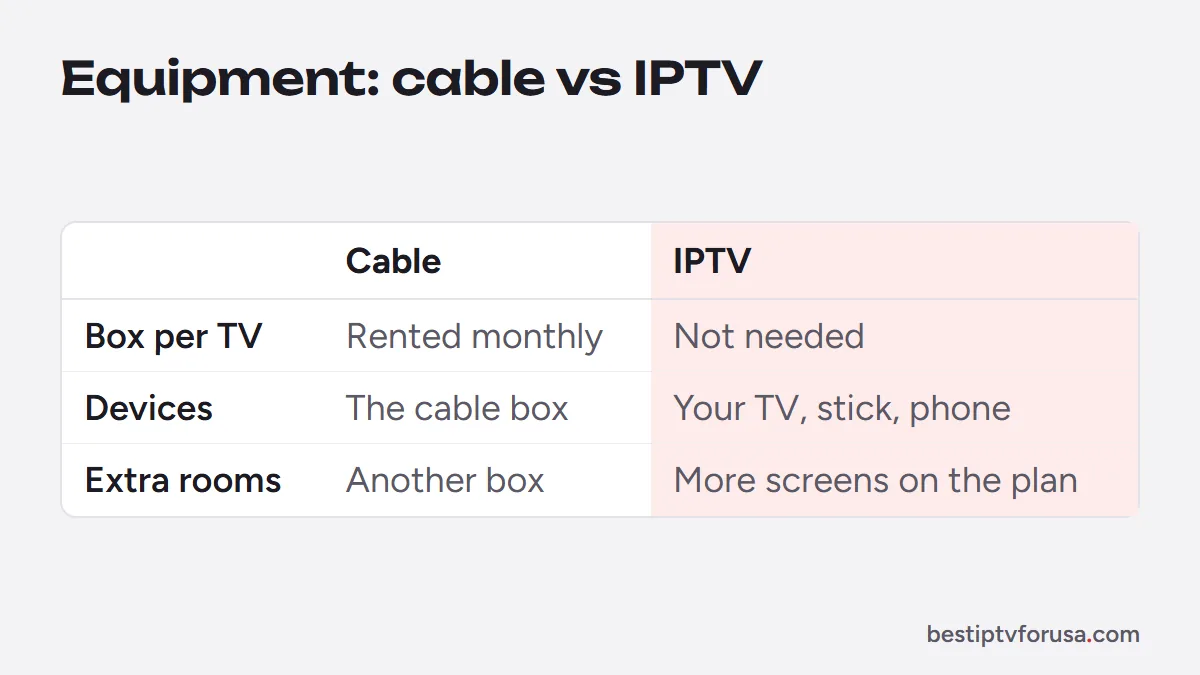
Cable needs a box for every TV, usually rented every month. IPTV plays through an app on the devices you already own: Fire TV, Roku, Apple TV, Android TV, Samsung and LG smart TVs, phones and computers. The number of screens depends on your plan, so the living room, a bedroom and a phone can play different channels at the same time. The setup guide shows which app to install on each device.
Picture quality and reliability
Cable delivers a steady picture because it does not share your home internet. IPTV quality depends on three things: the source stream, your device and your connection. Many live channels are broadcast in HD; 4K plays where the source is made in 4K and your TV and connection support it.
The honest trade-off:
- IPTV needs enough bandwidth. Plan for about 10 Mbps per HD screen and 25 Mbps per 4K screen playing at once. Our guide to internet speed for IPTV shows how to test it properly.
- Wi-Fi is a common weak point. An Ethernet cable or strong 5 GHz Wi-Fi often stops buffering.
- An internet outage stops IPTV. Cable, or a simple antenna for local broadcasts, keeps working when the internet does not.
Features you gain with IPTV
- Watch anywhere. There is no IP lock with BestIPTVforUSA, so your login works at home, on vacation or on a phone.
- Catch-up and on-demand. Rewind recent programs from the TV guide on supported channels, and browse movies and series without extra rental fees.
- Your choice of app. Pick the player and guide layout you like, from TiviMate’s guide grid to IBO Player Pro’s no-typing activation.
Where live TV streaming apps fit
Live TV streaming apps deliver a fixed lineup over the internet, like IPTV, and bill you every month like cable. They suit people who want one big-name app and do not mind automatic renewal. Compared with IPTV, check three things before you choose one: the monthly price after any introductory offer, whether it limits where you can watch, and how many screens it allows at once. Some households combine a free antenna for local broadcasts with one subscription, which is a valid setup too. For how these apps differ from an IPTV service day to day, see IPTV vs online TV.
IPTV stands apart on flexibility: you pick the player app and the guide layout, pay once for a period you choose, and use the same login on a TV, a stick or a phone.
Who should keep cable?
Cable still makes sense if your internet is slow, capped or unreliable, if no one at home wants to install an app, or if your cable is bundled with internet at a price you are happy with. Everyone else can test IPTV side by side with cable before cancelling anything. To weigh every option, our list of cable alternatives covers each way to replace cable, and how to watch live TV without cable walks through the setup.
How to switch without risk
- Run a speed test on the TV or stick you will use, at the time you usually watch.
- Start a 24-hour free trial and watch your usual programs, including a live event.
- Check the TV guide, catch-up and the number of screens you need.
- Choose a plan on the IPTV subscription page, then cancel cable once you are happy.
Questions people ask
Is IPTV better than cable?
For most households it is cheaper and more flexible: no contract, no rented box and watching on phones and tablets as well as TVs. Cable is steadier on a slow or unreliable internet connection, so test IPTV on your own connection first.
Why are people getting rid of cable TV?
Mostly price. US households pay a median of $125 a month for cable and satellite TV according to a 2026 doxo report, plus box rental and contracts. Internet-based TV costs less and works on devices people already own.
What can I replace my cable with?
An IPTV subscription played through an app, a live TV streaming app, a free antenna for local broadcasts, or a mix of these. The table in this article compares IPTV, cable and streaming apps side by side.
Do I need cable internet for IPTV?
You need home internet, not cable TV. Cable, fiber, DSL and 5G home internet all work if they deliver about 10 Mbps per HD screen and 25 Mbps per 4K screen playing at once.
Will IPTV work if my internet goes down?
No. IPTV streams over your connection, so an internet outage stops it. That is the one case where cable or an antenna keeps working.

Elmer Wenston writes the BestIPTVforUSA guides on IPTV setup, player apps and devices.