
By Elmer Wenston, updated . 5 min read.
IPTV Smarters Plus is a separate player app, not a new version of IPTV Smarters Pro. In the App Store, IPTV Smarters Plus is sold by a different seller from WHMCS Smarters, the developer of IPTV Smarters Pro and Smarters Player Lite, and it lists a paid subscription. Like every player, it has no channels of its own: it plays the IPTV service you sign in to. This guide explains what each app is, how they compare and how to check which one you are installing.
What IPTV Smarters Plus is
The App Store listing for IPTV Smarters Plus describes an “XC, M3U IPTV Stream Player” that supports several playlist formats (Smarters Plus on the App Store). The listing shows:
- Seller: Raja Hamilton, with a copyright line for Smarters Tech LLC;
- Price: free to download, with a subscription listed at $24.99 as an in-app purchase;
- Devices: iPhone, iPad and Apple TV, with a Mac version designed for iPad;
- Logins: Xtream Codes (“XC”) and M3U playlists.
The listing does not say how playlists are added step by step, so follow the screens in the app itself. Versions with the same name in other app stores may come from other developers: always read the developer name on the listing you are looking at.
Smarters Plus vs IPTV Smarters Pro
| Smarters Plus (App Store) | IPTV Smarters Pro | |
|---|---|---|
| Developer or seller | Raja Hamilton, Smarters Tech LLC | WHMCS Smarters |
| Apple version | Itself, on iPhone, iPad and Apple TV | Smarters Player Lite |
| Other devices | Check each store’s listing | Android, Fire TV, Samsung smart TVs, Windows and Mac |
| Price | Free download, $24.99 subscription listed | Free; Smarters Player Lite lists a $1.99 premium upgrade |
| Logins | Xtream Codes and M3U, per its listing | Xtream Codes (the login our guides use) |
| Channels included | None | None |
Sources: App Store listings for Smarters Plus and Smarters Player Lite, and the Samsung store listing for IPTV Smarters Pro, retrieved 2026-10-29.
The names are close, but the apps are not related versions of each other. Choosing between them is a question of which one runs on your device and which interface you prefer, not of “Plus” being an upgrade of “Pro”.
What you need to add a playlist in IPTV Smarters Plus
Whatever Smarters app you use, the login comes from your IPTV provider’s welcome email, in one of two forms:
- Xtream Codes: a server URL, a username and a password. This is the login most players read best, with live TV, movies and series in separate sections.
- M3U link: a single web address for the whole playlist.
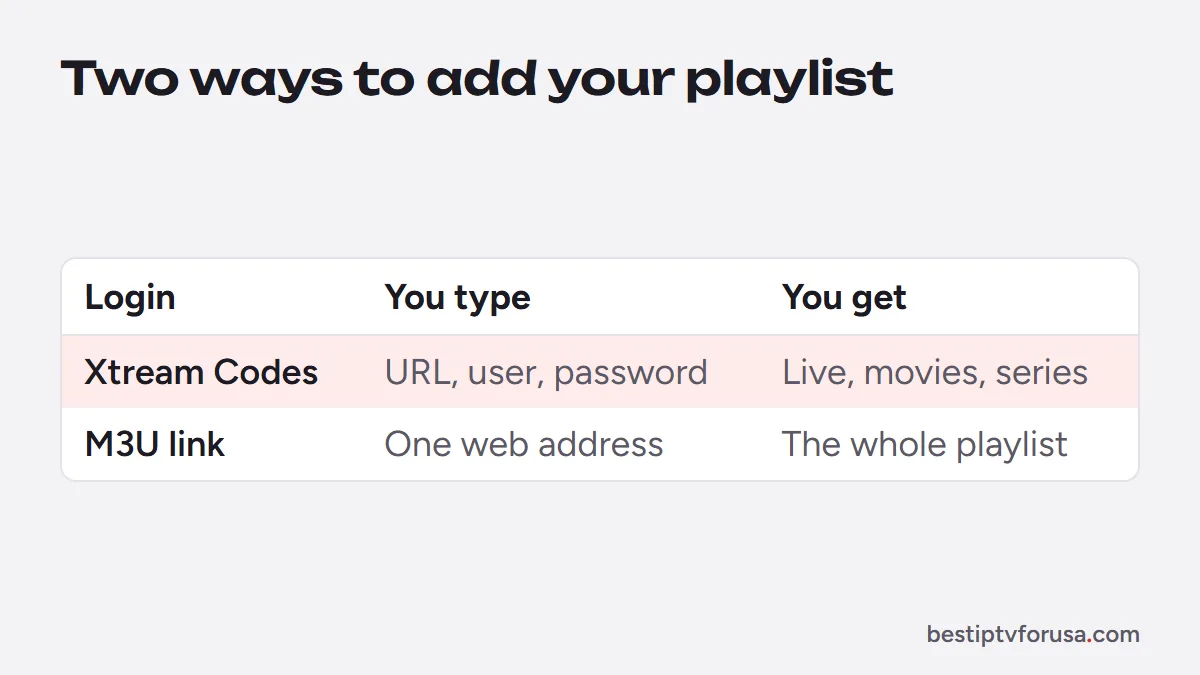
Open the app, choose to add a playlist or a user, pick the login type and type the details exactly as they appear in your email. Our comparison of Xtream Codes vs M3U explains which to choose when your provider offers both.
Check the developer before you install
Many apps use “Smarters” in their name, from many different developers. A similar name does not mean the same developer. Before you install any of them:
- Read the developer or seller name on the store listing. IPTV Smarters Pro and Smarters Player Lite come from WHMCS Smarters.
- Read the price and in-app purchases. A subscription inside a player app pays for the app’s features; it does not include channels.
- Avoid APK mirrors and modified versions from unknown websites, which can carry unwanted software.
- Never pay a player app for channels. The channels come from your IPTV provider; our guide to the IPTV Smarters Pro subscription explains that difference.
Which Smarters app should you use?
- Fire TV and Android TV: IPTV Smarters Pro no longer has a working official download (checked October 2026), as our IPTV Smarters setup guide explains; use TiviMate or IBO Player Pro.
- iPhone, iPad and Apple TV: Smarters Player Lite, free from WHMCS Smarters; Smarters Plus is an alternative if you prefer its interface and are happy with its in-app subscription terms.
- Samsung smart TVs: IBO Player Pro or Hot Player, which our smart TV guide covers.
- Roku: check the developer of any Smarters-named Roku channel; our IPTV on Roku page covers Hot Player.
Smarters Player Lite vs Smarters Pro compares the two WHMCS Smarters apps in detail.
Smarters Plus not working: quick checks
Most problems with any Smarters app come from the login, not the app. Before reinstalling, go through these checks:
| What you see | Likely cause | Fix |
|---|---|---|
| The app opens but shows no channels | No playlist added yet | Add your Xtream Codes login or M3U link |
| Login refused | A typing error in the server URL, username or password | Retype each field exactly, including http:// and the port |
| Channels load, guide empty | Guide not loaded yet, or M3U link without a guide | Wait a few minutes, then refresh; prefer the Xtream Codes login |
| Streams stop when another screen plays | Too many screens at once for your plan | Stop one screen, or choose a plan with more connections |
| A prompt asks you to pay for channels | A look-alike app, or the app’s own subscription | Do not pay a player app for channels; check the developer name and get channels from your IPTV provider |
If the same login works in another player but not in Smarters Plus, the problem is the app; if it fails everywhere, contact your provider. Our guide to fixing IPTV Smarters “failed to authorize” covers the login errors in detail, and IPTV multiple connections explains the screen limit.
Try your Smarters app with a free login
The login from your IPTV provider works in any of these apps, so you can compare them on your own device. Request a 24-hour free trial, type the Xtream Codes login in the app you prefer, and keep the one whose guide and menus suit you best.
Questions people ask
Is IPTV Smarters Plus the same as IPTV Smarters Pro?
No. They are separate apps. The App Store lists IPTV Smarters Plus under a different seller, while IPTV Smarters Pro and Smarters Player Lite come from WHMCS Smarters.
Is Smarters Plus free?
The App Store version is free to download and lists a $24.99 subscription as an in-app purchase. Prices can change, so check the listing on your device.
Does Smarters Plus come with channels?
No. It is a player for Xtream Codes and M3U playlists. The channels come from the IPTV service you sign in to, which is a separate subscription.
Does Smarters Plus work on Roku?
We have not confirmed a Roku listing from the App Store seller, so check the developer name on any Smarters-named Roku channel before installing. On Roku, Hot Player is the option our setup guides cover.

Elmer Wenston writes the BestIPTVforUSA guides on IPTV setup, player apps and devices.