
By Elmer Wenston, updated . 5 min read.
A VPN for IPTV is optional. IPTV works without one: the player app connects to the provider’s server over your home internet, and a VPN only changes the route that traffic takes. A VPN can help in two situations, privacy on shared Wi-Fi and an internet provider that slows video, and it can hurt in two others, extra delay and servers that refuse VPN connections. The only way to know which applies to you is to test both ways on your own connection. If your stream is not playing at all, start with our guide for when IPTV is not working.
What a VPN actually does
A VPN app sends your device’s traffic through a server run by the VPN company, usually encrypted along the way. Your internet provider then sees a VPN connection, and the VPN company can see your traffic instead. The FTC puts it plainly: a VPN shifts trust from your internet or Wi-Fi provider to the VPN company, which can see your traffic instead (FTC, tips for using VPN apps).
So a VPN does not make you invisible, and it does not change what a service is allowed to stream. It changes who can see your traffic and the path it takes.
When a VPN helps with IPTV
- Your internet provider slows video. Some providers manage traffic at busy times. If IPTV buffers in the evening while speed tests look fine, a VPN can show whether video traffic is being slowed: if the same channel plays smoothly with the VPN on, that is a strong hint.
- You want privacy on shared Wi-Fi. On shared or public Wi-Fi, such as a hotel or a dorm, a VPN encrypts your traffic so others on that network cannot read it.
- You watch while traveling. Your login works anywhere, with no IP lock on BestIPTVforUSA plans, but a VPN adds privacy on networks you do not control.
When a VPN hurts IPTV
Many people hope a VPN will stop buffering; our guide Does a VPN stop buffering? explains why it rarely does, with a 5-minute test.
- Extra delay. Every stream now goes through the VPN server first. A distant or busy server adds delay, and live TV, which keeps only a few seconds in reserve, starts to buffer. Our IPTV buffering guide covers the other causes.
- Refused connections. Some IPTV servers block traffic that comes from known VPN servers, which shows up as a login error or channels that will not load.
- Weaker devices. Encryption takes processing power. On a small streaming stick, a VPN app running in the background can slow the player.
How to test a VPN with IPTV
- Pick one channel and one time, ideally your usual evening viewing time.
- Watch for ten minutes without the VPN and note any buffering.
- Connect the VPN to a server close to you and watch the same channel for ten minutes.
- Compare. If the VPN version is smoother, keep it for streaming. If it is worse or the channel will not load, leave it off.
Repeat once on another evening: a single test can be misleading.
How to set up a VPN on a Fire TV or TV box
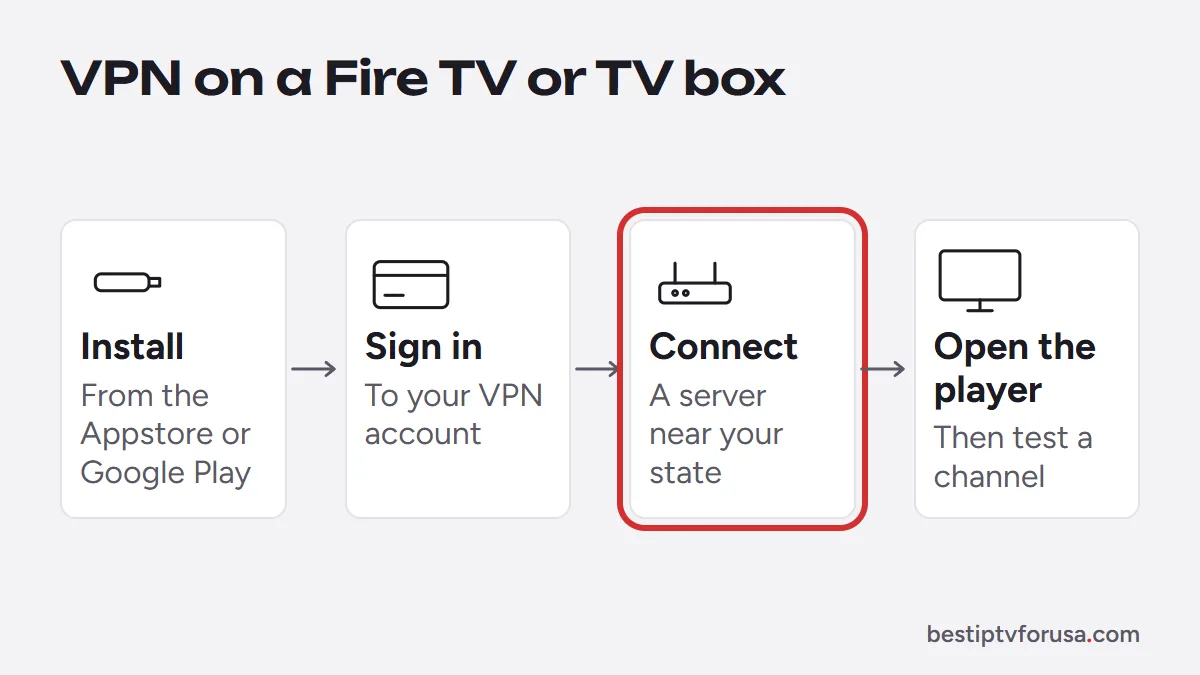
In short: install your VPN provider’s app from the Amazon Appstore on a Fire TV or from Google Play on Android TV and Google TV, sign in, connect, then open your IPTV player. Smart TVs without VPN apps need the VPN on the router, which slows every device at home. Our guide on how to use a VPN on an IPTV box has the full steps for each device and a speed test with and without the VPN.
For the player app itself, follow the setup guide for your device, starting with IPTV on Firestick.
Common VPN problems with IPTV, and the fix
| What you see | Likely cause | What to try |
|---|---|---|
| Channels load slowly or buffer only with the VPN on | Server too far or too busy | Pick a server in or near your state |
| Login error only with the VPN on | The IPTV server refuses that VPN address | Change VPN server, or turn the VPN off for streaming |
| The stick feels slow everywhere | VPN app using the device’s processing power | Close other apps, restart, or use the VPN only when needed |
| The TV guide shows the wrong times | Device time zone can change with the VPN location | Set the device’s time zone manually |
| Everything stops when the VPN drops | The VPN’s “block internet if disconnected” setting | Reconnect, or turn that setting off on the TV |
Several of these come down to one choice: a server close to you. If none of the fixes help, the simplest answer is to leave the VPN off on the TV and keep it for your phone and laptop.
Choosing a VPN: what to check
| Check | Why it matters for IPTV |
|---|---|
| Servers near you | Shorter distance means less delay and less buffering |
| An app for your device | Fire TV and Android TV need a native app |
| Clear privacy policy | The VPN company can see your traffic |
| Paid, not free | The FTC notes many free VPN apps make money from ads or data sharing |
| Easy on and off | You may want it off for streaming and on elsewhere |
A VPN does not make a provider trustworthy
Use a VPN for what it does: privacy and routing. It does not turn a risky provider into a safe one. Judge the IPTV service on its own merits: a free trial, public prices, a written refund policy and support you can reach before paying. Our guide to legit IPTV services and red flags lists what to check, and you can test BestIPTVforUSA with or without a VPN during the 24-hour free trial.
Questions people ask
Do I need a VPN for IPTV?
No, it is optional. IPTV works without a VPN. Some people use one for privacy on shared or public Wi-Fi or when their internet provider slows video; others leave it off because it can add buffering.
Will a VPN stop IPTV buffering?
Only when the cause is your internet provider slowing video traffic. When the cause is Wi-Fi, device memory or too many screens, a VPN does not help and can make buffering worse. Test with the VPN off first.
Why won't IPTV work with a VPN?
Some IPTV servers block connections that come from VPN servers, and a VPN server far away can be too slow for live TV. Try a VPN server closer to you, or turn the VPN off for streaming.
Is there a free VPN for IPTV?
Free VPN apps exist, but the FTC warns that many earn money from in-app advertising or by sharing your information with third parties.
Does a VPN make IPTV legal?
No. A VPN changes how your traffic travels; it does not change what a service is allowed to stream. Choose a provider you trust for its own sake, with a trial, a refund policy and support you can reach.

Elmer Wenston writes the BestIPTVforUSA guides on IPTV setup, player apps and devices.