
By Elmer Wenston, updated . 5 min read.
How to add IPTV to Plex comes down to one fact: Plex cannot read an M3U playlist on its own. Its Live TV feature is built to talk to TV tuners, so IPTV needs a bridge, a small open-source program that reads your M3U playlist and TV guide and offers them to Plex as if they came from a tuner. That route works well for people who already run a Plex server; for everyone else, a dedicated IPTV player is faster. This guide explains both.
How Live TV works in Plex
Plex’s Live TV and DVR feature was designed for broadcast TV. Plex’s support FAQ explains that with a compatible tuner and an antenna connected to a Plex Media Server, all users can watch over-the-air broadcasts live for free, while recording with the DVR requires a Plex Pass subscription. It also notes that full Live TV support, including time shifting, needs Plex Media Server 1.16.1 or newer, set up with a DVR on your server (Plex support: Live TV and DVR FAQ).
The key word is tuner. Plex expects a device that receives TV channels, such as an antenna tuner on your network, and builds its channel list and guide from it. An IPTV service is not a tuner: it gives you an M3U playlist link and an XMLTV guide link. That mismatch is why there is no simple “add playlist” button.
Can Plex play an M3U playlist?
Not in its Live TV setup. Search results still show old Plex plug-ins for IPTV, such as community “bundle” projects on GitHub. Those were built for an older plug-in system and are not the way Plex adds live TV today. If a guide tells you to drop a plug-in folder into your Plex server, treat it with caution.
The practical route in 2026 is a tuner bridge: a program that sits between your IPTV links and Plex.
Add IPTV to Plex with a tuner bridge
One actively maintained bridge is Threadfin. Its project page describes it as an “M3U Proxy for Plex DVR and Emby/Jellyfin Live TV,” based on the older xTeVe project, released under the open-source MIT license (Threadfin on GitHub). It reads your M3U playlist and your XMLTV guide and passes the channels and guide to Plex’s DVR feature; its documentation explains how to choose and map channels.
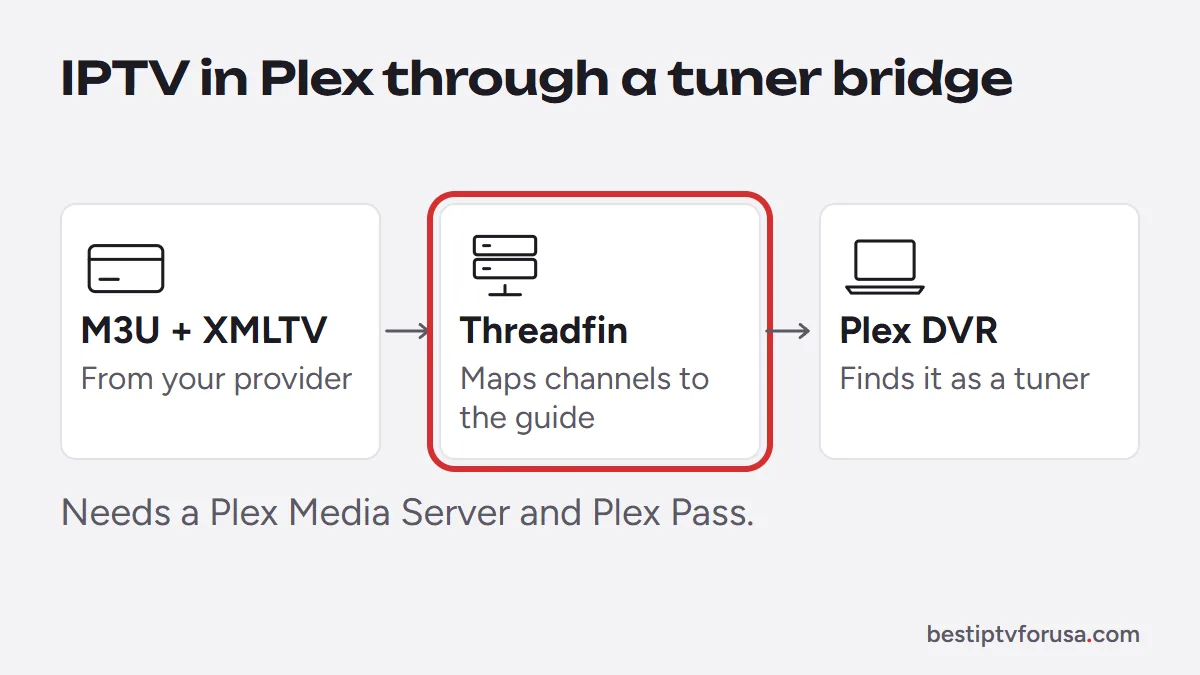
What you need before you start:
- A Plex Media Server on a computer or NAS that stays on.
- Plex Pass, which Threadfin’s documentation lists among its requirements together with Plex Media Server 1.11.1.4730 or newer and a DVR-capable Plex app.
- Your IPTV links: the M3U playlist URL from your provider’s welcome email, and the XMLTV guide URL, which you can ask your provider’s support for if it is not in the email.
- A way to run Threadfin: its documentation offers a Docker image, a Kubernetes chart and building from source.
The process, in outline:
- Install and start Threadfin on the same network as your Plex server.
- In Threadfin, add your M3U playlist link and your XMLTV guide link.
- Choose the channels you want and map each one to its guide entry.
- In the Plex Web App, open your server’s settings and look for the Live TV and DVR option to set up a DVR. Select the tuner Threadfin provides; if Plex does not list it, enter Threadfin’s network address as the Threadfin documentation describes. Menu names change between versions, so look for those words rather than an exact path.
- Let Plex load the channel list and the guide, then open Live TV in any Plex app.
Each channel Plex plays through the bridge uses one of your plan’s screens, so a one-screen plan supports one Plex stream at a time.
Follow the Threadfin documentation for its side and Plex’s DVR setup screens for the other.
Add the TV guide (XMLTV)
The guide comes from an XMLTV link from your provider, separate from the playlist; ask support for it if you do not have it. The bridge passes it to Plex together with the channels. Two details make the difference between a full guide and an empty one:
- Channel matching. Each channel in the playlist must match its entry in the XMLTV file. Bridges let you map them by hand when the names differ.
- Refresh. Guide data covers a few days ahead; the bridge and Plex refresh it on a schedule. After changing mappings, refresh the guide in both.
Our guide to the IPTV EPG explains how guide files work, and M3U playlists explained covers the playlist side.
Plex or a dedicated IPTV player?
Jellyfin, another media server, reads an M3U playlist without a bridge; see our Jellyfin IPTV guide.
Plex with a bridge makes sense if you already run a Plex server, want live channels next to your own media library and are comfortable with Docker or similar tools. For live TV alone, it is a lot of setup:
| Plex with a bridge | Kodi | Dedicated IPTV player | |
|---|---|---|---|
| Reads your IPTV links | Through Threadfin or similar | Directly, with PVR IPTV Simple Client | Directly |
| Extra software | Bridge plus Plex Media Server | Kodi and one add-on | None |
| Subscription for the feature | Plex Pass for the DVR route | None | Free or small app fee |
| Setup time | Longest | Medium | Shortest |
Kodi reads an M3U playlist directly through its official add-on, and players such as TiviMate or IPTV Smarters sign in with one login. Our comparison of the best IPTV player apps covers each device.
Common problems when adding IPTV to Plex
| Problem | Likely cause | Fix |
|---|---|---|
| Plex does not find a tuner | Bridge not running or on another network | Start the bridge on the same network as the server |
| Channels appear, guide is empty | Channels not mapped to XMLTV entries | Map channels in the bridge, then refresh the guide |
| Setup asks for Plex Pass | DVR feature requires it | Subscribe, or use Kodi or a dedicated player instead |
| Some channels fail to play | Stream format or bandwidth | Test the same channel in a dedicated player; check your connection |
To test your IPTV links before you build anything, request a 24-hour free trial and try them first in a simple player. If the channels play well there, they are ready for the bridge.
Questions people ask
Can you add IPTV channels to Plex?
Yes, but not directly. Plex does not accept an M3U playlist on its own; you run a bridge such as Threadfin that reads your playlist and TV guide and presents them to Plex's Live TV and DVR feature.
Does Plex accept M3U playlists?
Not in its Live TV setup, which looks for TV tuners. An M3U playlist has to go through a bridge tool that Plex can see as a tuner.
Do I need Plex Pass to watch IPTV in Plex?
With a bridge such as Threadfin, yes: its documentation lists Plex Pass as a requirement, because it works through the DVR feature. Plex's own FAQ says that watching over-the-air TV live from a compatible tuner is free, while DVR recording needs Plex Pass.
Is Plex better than an IPTV player?
They do different jobs. Plex organizes and streams your own media library and can add live TV through a tuner or a bridge. An IPTV player signs in to your IPTV service directly and is much quicker to set up for live channels.

Elmer Wenston writes the BestIPTVforUSA guides on IPTV setup, player apps and devices.